

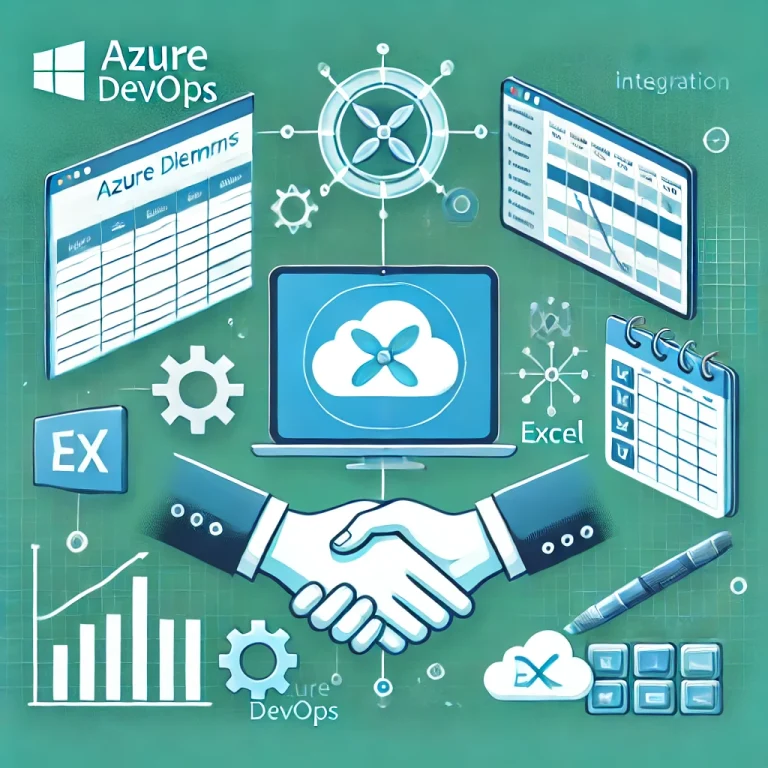
When using Azure DevOps, it is often a challenge to modify the status of multiple Work Items in large projects at the same time. This can significantly complicate admin tasks and make the project management process time consuming.
However, Azure DevOps’ bulk editing feature can provide a solution to this problem. It allows you to edit the state of multiple Work Items at once, either tagging them or moving them between iterations.
However, if you need to create a more complex, bulk work item, a Microsoft Excel add-in can be of great help. This supports adding Work Items, updating existing Work Items, adding links or attachments to multiple Work Items and much more.
By using these, consultants and project teams can respond quickly and efficiently to changing requirements or needs related to current project processes. This can result in improved project efficiency and reduced administrative workload. The ability to manage work items in bulk can result in significant time and resource savings throughout the project lifecycle.
So how can we use this solution?
There are a few prerequisites that are necessary to use this operation:
- Microsoft Excel 2010 or later must be installed
- You need to install Azure DevOps Office Integration 2019 (Available for free at https://visualstudio.microsoft.com/downloads/?ref=techielass.com#other-family)
- You must be a member of the project you want to edit.
- Must be allowed to view Work Items and edit WorkItems in the project
- If you want to add or edit Work Items, you must have stakeholder access
If all the necessary conditions have been met, the following steps can be followed to modify and create work items en masse:
- Open Excel
- Click on the Team tab in the top menu (this should appear automatically after installing the extension. If it is not available, you can uncheck it in the customize menu bar to make it visible).
To be able to make bulk changes, we need to connect the Excel plugin to the Azure DevOps environment. This requires the following steps:
- Click on New List
- This will activate a pop-up window that will ask us to connect to an Azure DevOps Server.
- Click on the Servers button
- Click on the Add button
- Enter the URL of the Azure DevOps server
- Then click OK
- You will be prompted to authenticate the Azure DevOps server
- Then click Close to connect Excel to the DevOps server.A beépülő modul mostantól információkat kap a csapatprojektekről.
- Here we will be able to select the project within which we want to make the changes
10. You need to select which Work Items you want to download from the Azure DevOps tables to Excel (the connection will always pull the items from a query created in DevOps, so it is a prerequisite that there is a view, a list created under the project).
11. Now we can start making the necessary changes. When you are done, click on the Publish button under the Team tab. This will send the completed changes to the server where Azure DevOps will do its job.
If you refresh the Azure DevOps view in your browser, you will see the changes you have made.
Bulk editing Azure DevOps items using Excel is a significant time and resource saver for everyone. For projects larger than Visual Labs, this feature is regularly used by our project managers and consultants, and it greatly helps us to operate more efficiently.

Problem Statement
Monitoring of the three platforms mentioned in the title is solved independently in different locations. Logic Apps can be monitored either from the resource’s run history page or through the Logic App Management solution deployed to a Log Analytics workspace. Azure Functions have Application Insights, while the run history of Microsoft Flows is available on the Power Platform.Most of our clients’ solutions consist of these resources, which often chain together and call each other to represent business processes and automations. Their centralized supervision is not solved, making error tracking and analysis difficult for employees. Moreover, they had to log into the client’s environment to perform these tasks.
Goal
We wanted to get a general overview of the status of the solutions we deliver to our clients, reduce our response time, and proactively prevent error reports submitted by our clients. We aimed to track our deployments in real-time, providing a more stable system and a more convenient user experience. We wanted to make our monitoring solution available within Visuallabs so that we could carry out monitoring tasks from the tenant that hosts our daily development activities.
Solution
Infrastructure Separation
Our solution is built on the infrastructure of a client used as a test subject, whose structure can be considered a prerequisite. On the Azure side, separate subscriptions were created for each project and environment, while for Dynamics, only separate environments were used. Project-based distinction for Flows is solved based on naming conventions, and since log collection is manual, the target workspace can be freely configured.
Centralized Log Collection
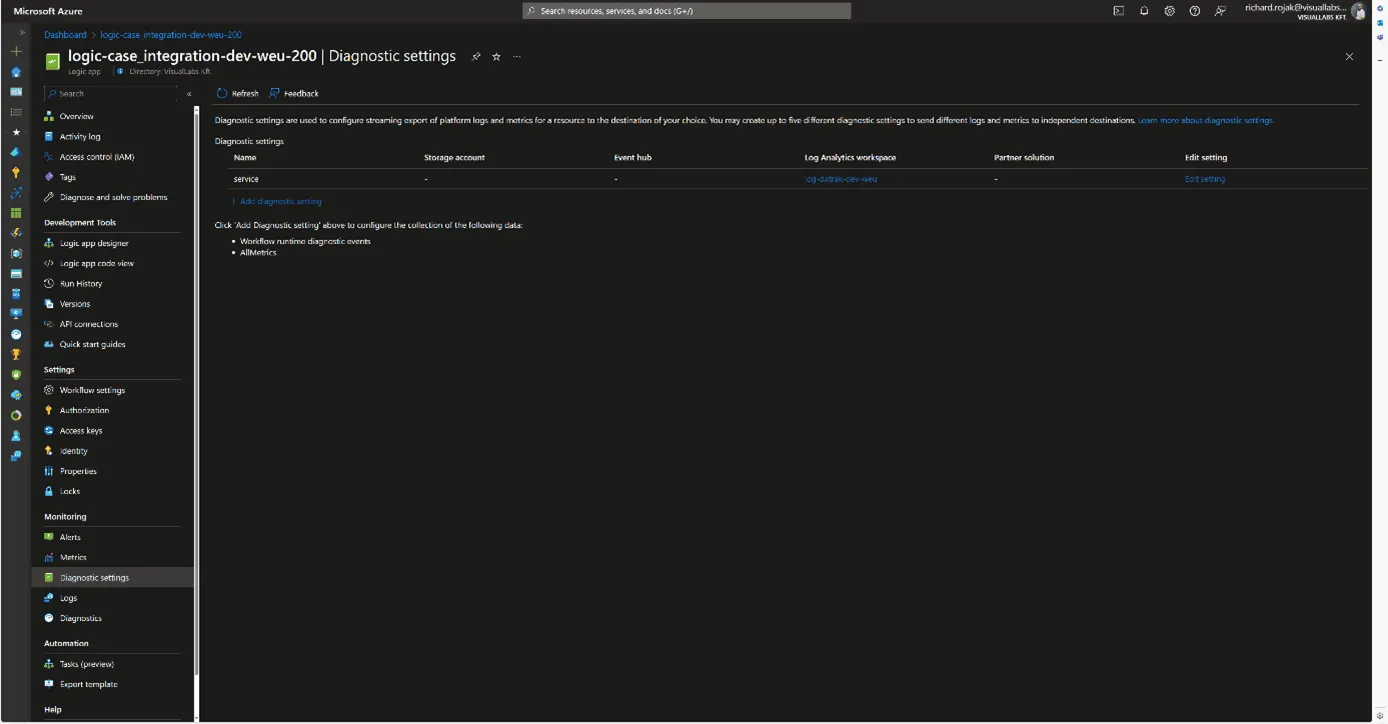
It was obvious to use Azure Monitor with Log Analytics workspaces for log collection. Diagnostic settings were configured for all Azure resources, allowing us to send logs to a Log Analytics workspace dedicated to the specific project and environment. For Microsoft Flows, we forward logs to a custom monitor table created for Flows using the built-in Azure Log Analytics Data Collector connector data-sending step. This table was created to match the built-in structure of the Logic Apps log table, facilitating the later merging of the tables.


Making Logs Accessible in Our Tenant
An important criterion for the solution was that we did not want to move the logs; they would still be stored in the client’s tenant; we only wanted to read/query them. To achieve this, we used Azure Lighthouse, which allows a role to be enforced in a delegated scope. In our case, we set up a Monitoring contributor role for the client’s Azure subscriptions for a security group created in our tenant. This way, we can list, open, and view resources and make queries on Log Analytics workspaces under the role’s scope from our tenant.
Visualization
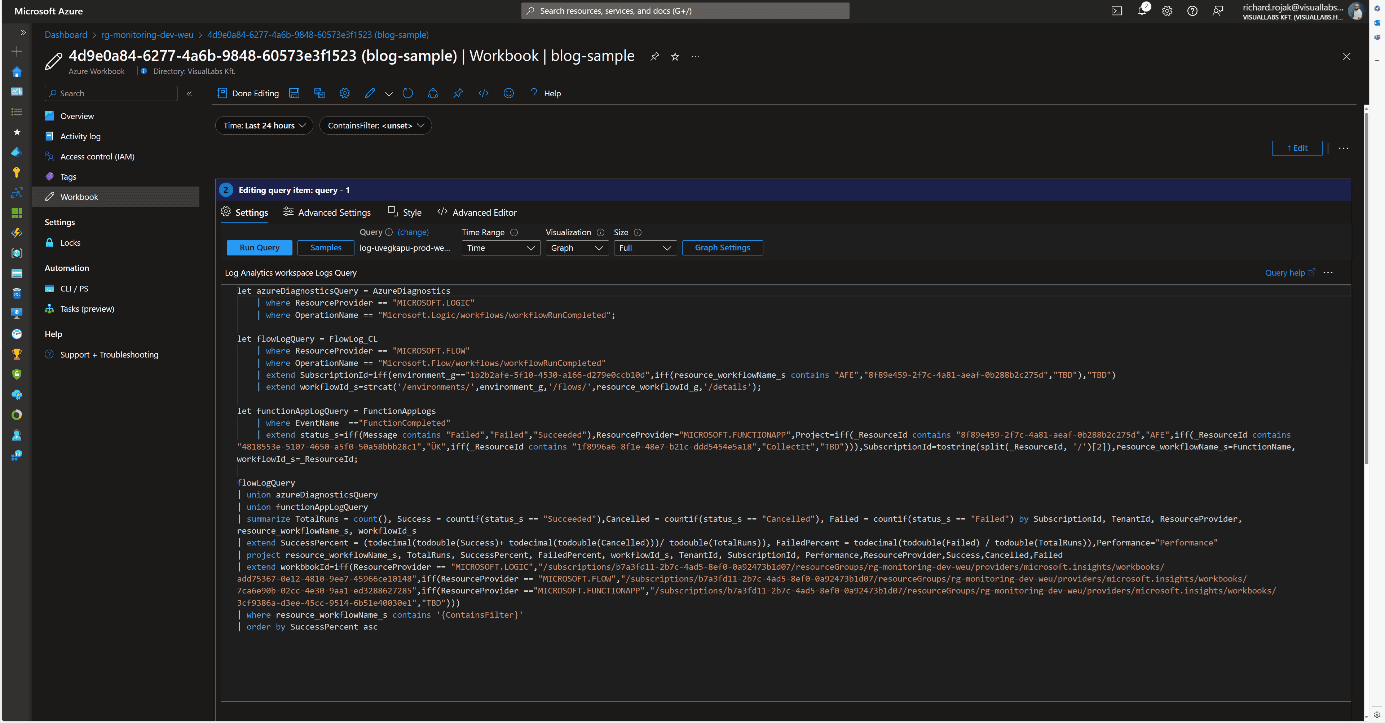
For visualization, we used Azure Monitor Workbook, which allows data analysis and visual report creation, as well as combining logs, metrics, texts, and embedding parameters. All Log Analytics workspaces we have read access to via Lighthouse can be selected as data sources. Numerous visualizations are available for data representation; we primarily used graphs, specifically honeycomb charts, but these can easily be converted into tables or diagrams.

Combining, Customizing, and Filtering Tables
To process log tables from different resources together, we defined the columns that would be globally interpretable for all resource types and necessary for grouping and filtering.These include:
- Client/Tenant ID
- Environment/Subscription ID
- Resource ID/Resource Name
- Total number of runs
- Number of successful runs
- Number of failed runs
Based on these, we could later determine the client, environment, project, resource, and its numerical success rate, as well as the URLs needed for references. These formed the basis for combining tables from various Log Analytics Workspaces and resources for our visualizations.
User Interface and Navigation
When designing the user interface, we focused on functionality and design. Our goal was to create a visually clear, well-interpreted, interactive solution suitable for error tracking. Workbooks allow embedding links and parameterizing queries, enabling interactivity and interoperability between different Workbooks. Utilizing this, we defined the following levels/types of pages:
- Client
- Project
- Resources
- Logic App
- Azure Function
- Flow

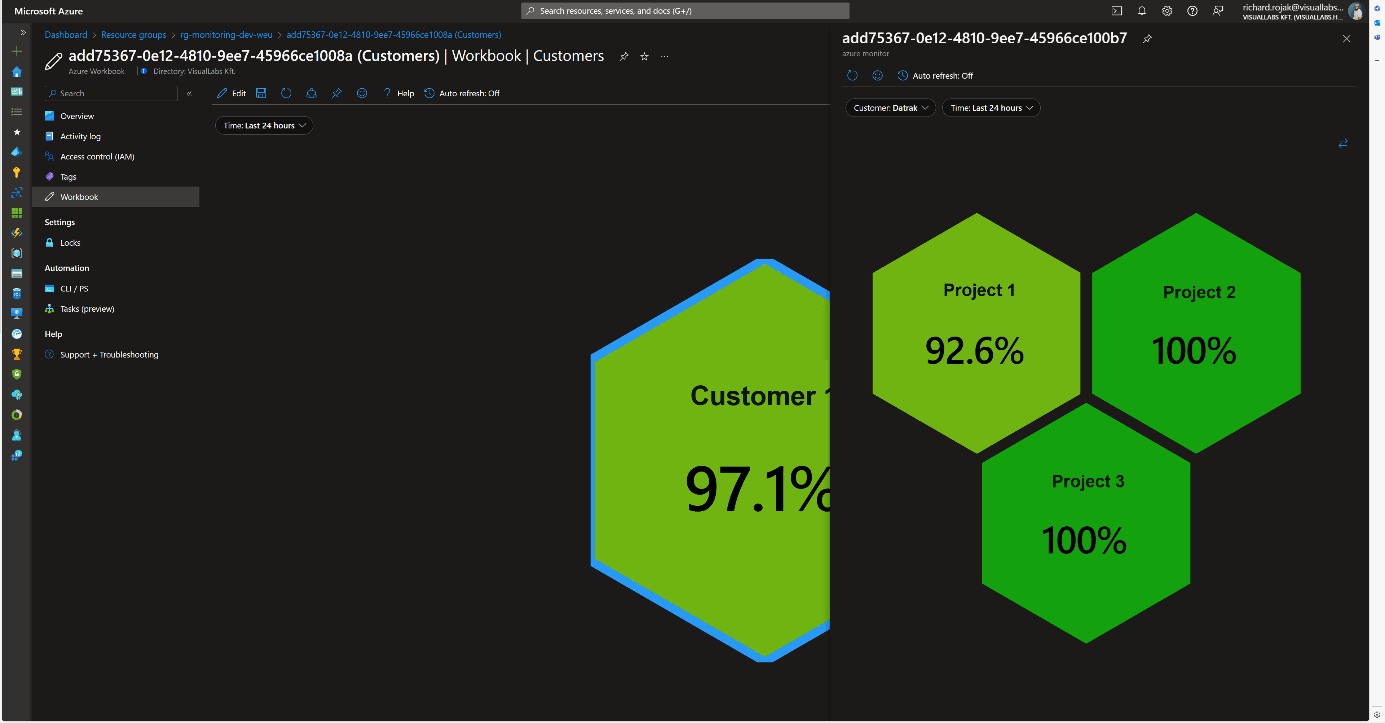
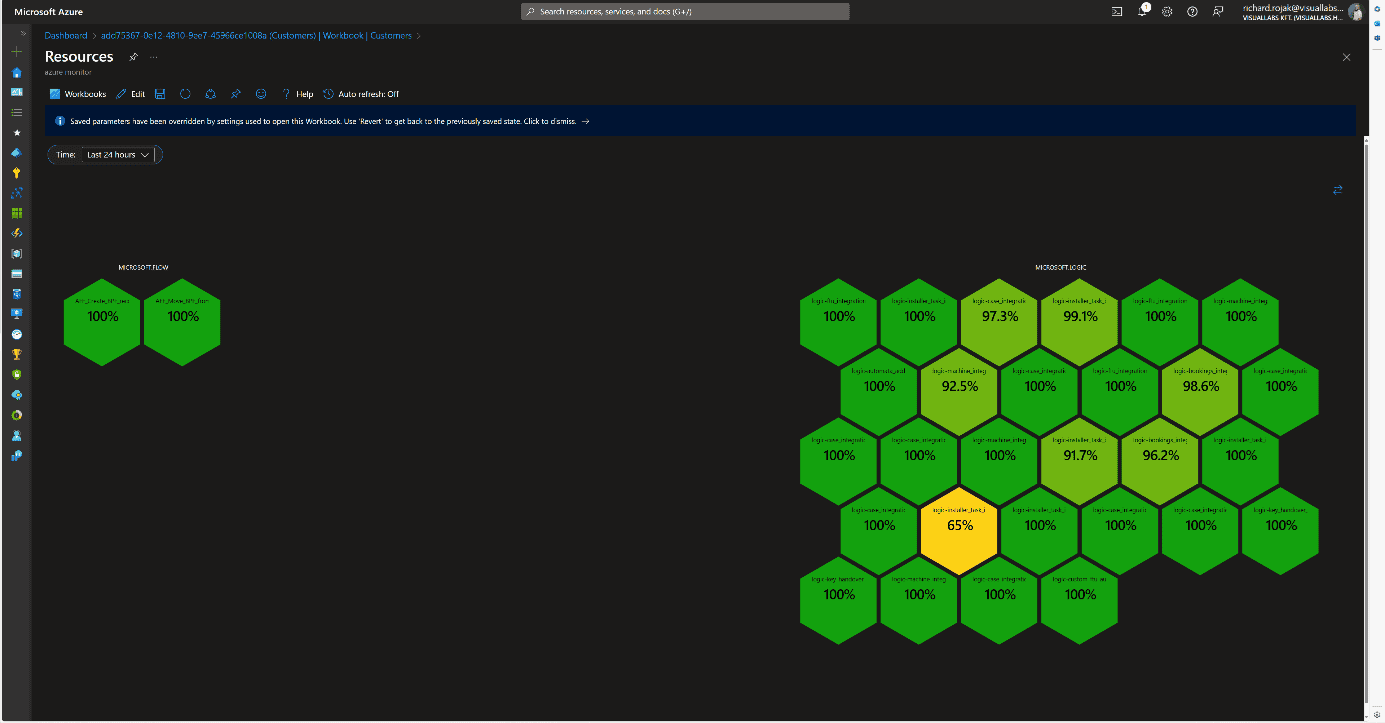
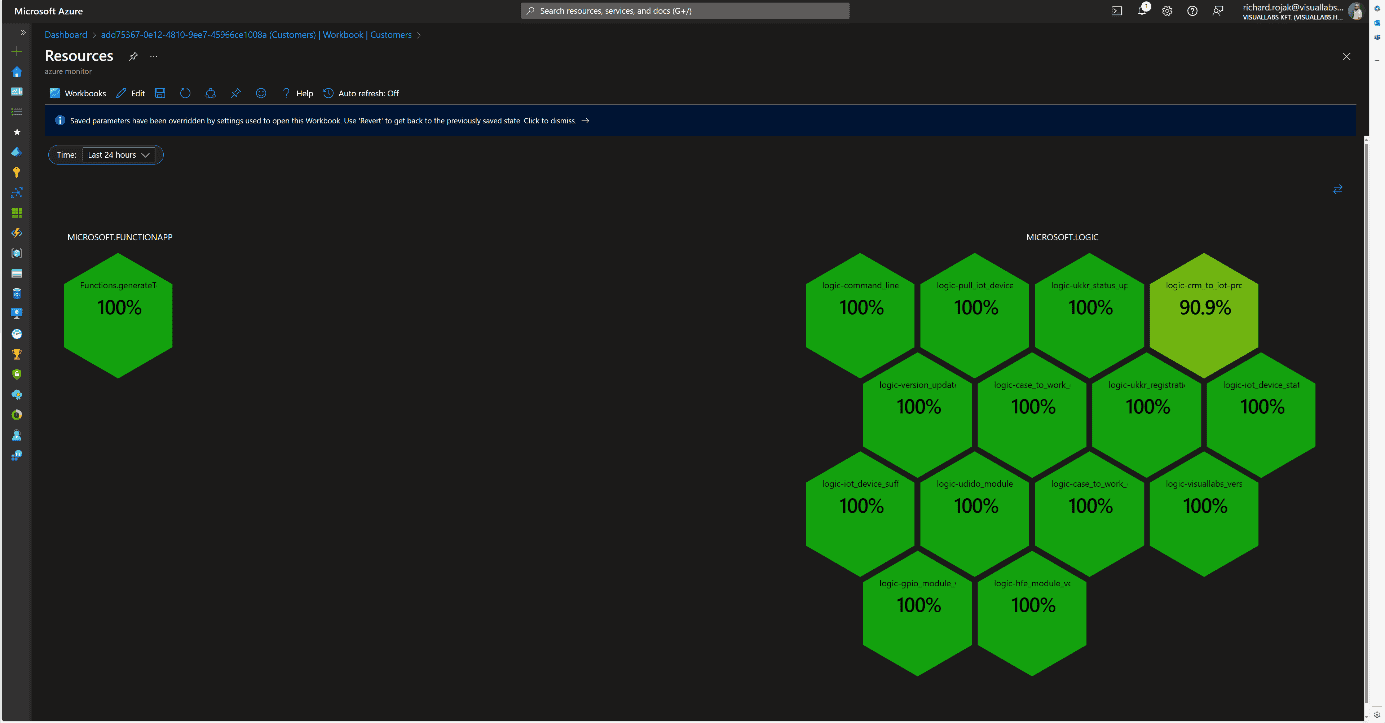

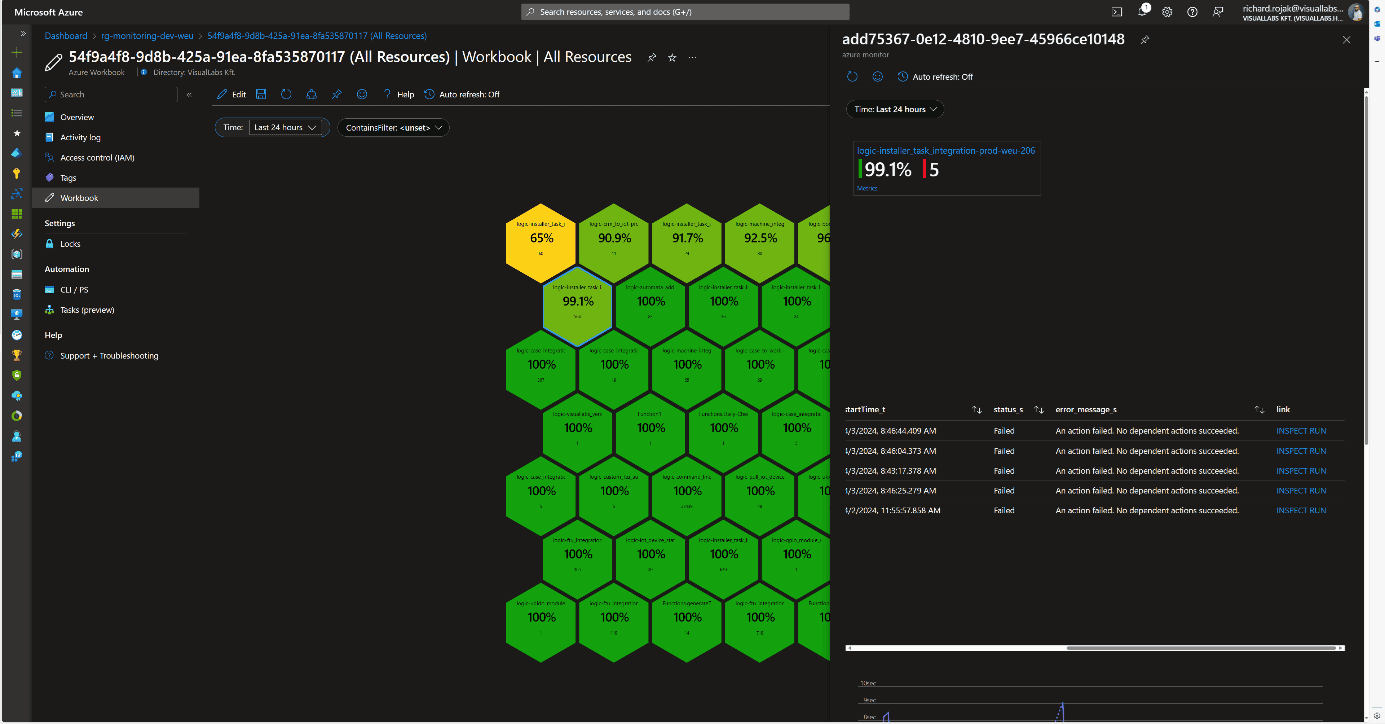
Resources [Azure Function] At the Client and Project levels, clicking on their names displays the next subordinate Workbook in either docked or full-window view, passing the appropriate filtering parameters. Time is passed as a global parameter during page navigation, but it can be modified and passed deeply on individual pages. We can filter runs retrospectively by a specific minute, hour, day, or even between two dates.On the page displaying resources, we provide multiple interactions for users. Clicking on resource names navigates to the resource’s summary page on the Azure Portal within the tenant, thanks to Lighthouse, without tenant switching (except for Power Automate Flows).Clicking on the percentage value provides a deeper insight into the resource’s run history and errors in docked view. This detailed view is resource type-specific, meaning each of the three resources we segregated has its own Workbook. We always display what percentage of all runs were successful and how many faulty runs occurred, with details of these runs.
Logic App
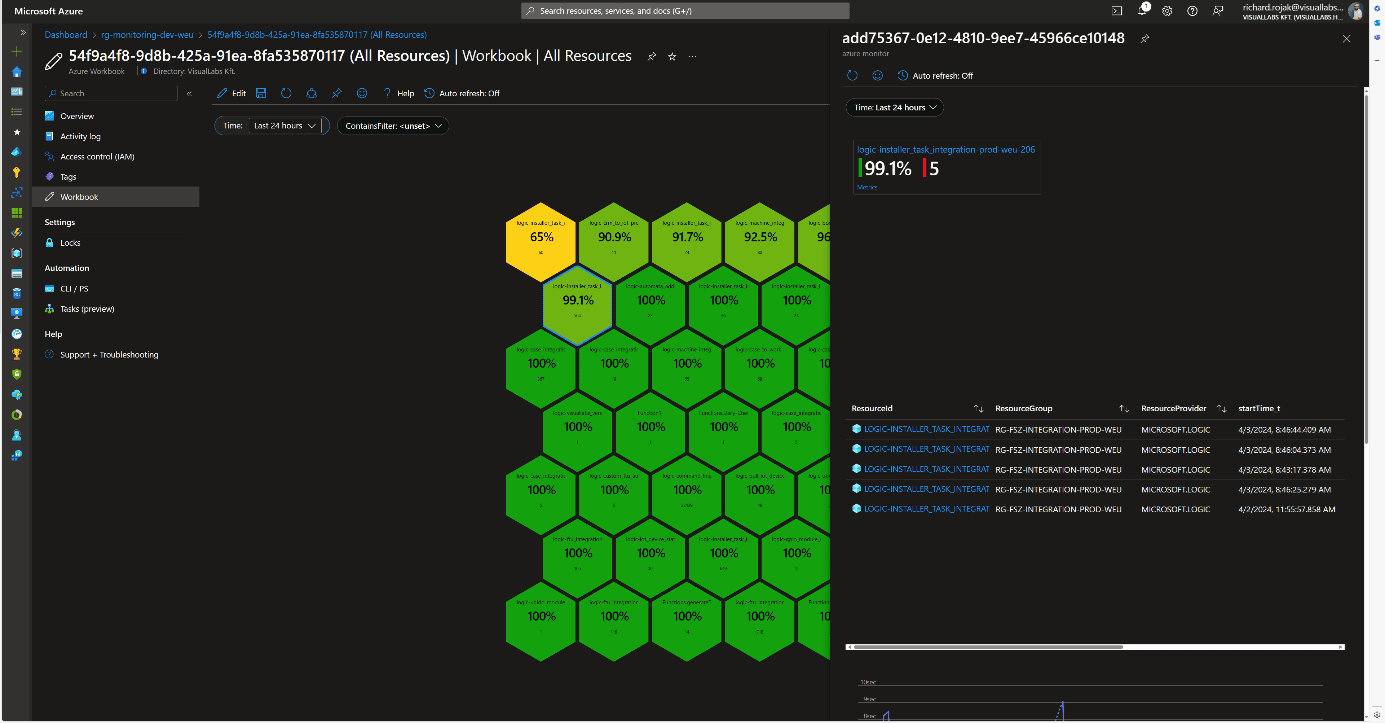
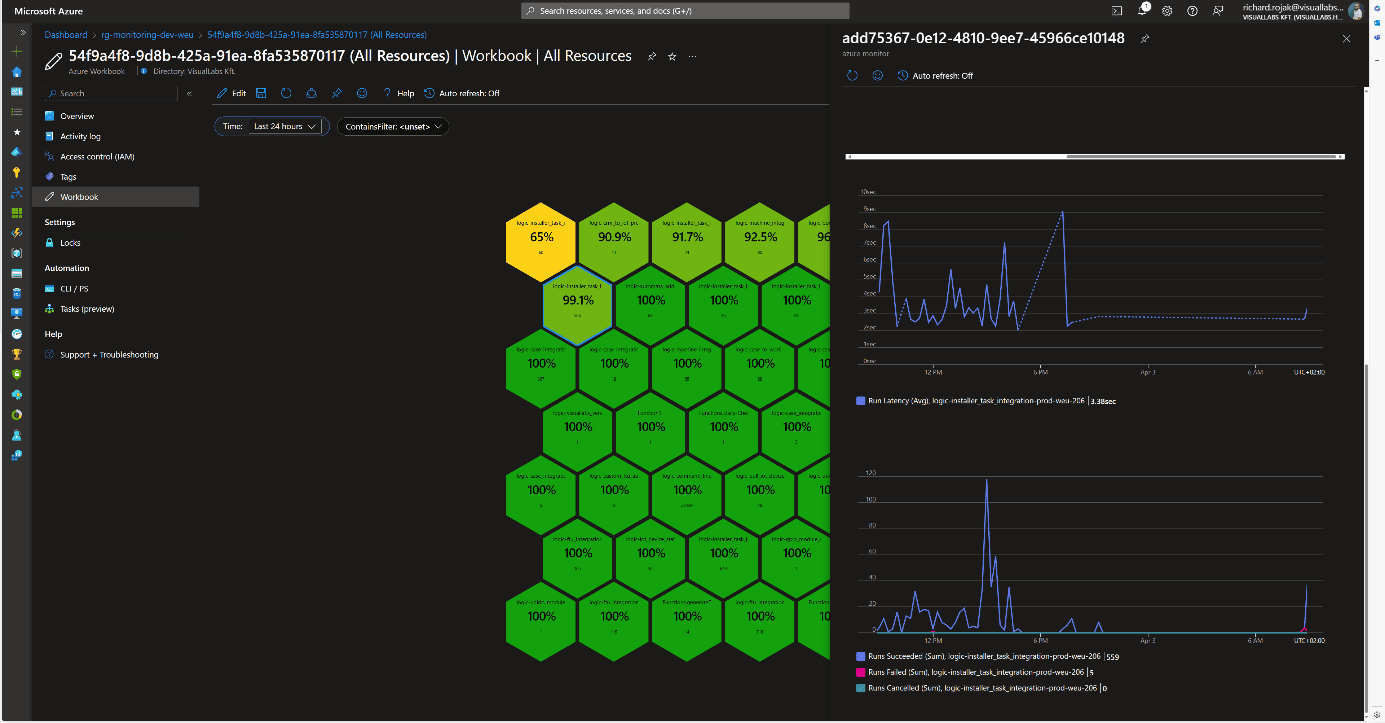
Beyond general information, faulty runs (status, error cause, run time) are displayed in tabular form if any occurred during the specified time interval. Clicking the INSPECT RUN link redirects the user to the specific run where all successful and failed steps in the process can be viewed. At the bottom, the average run time and the distribution of runs are displayed in diagram form.
Microsoft Flow
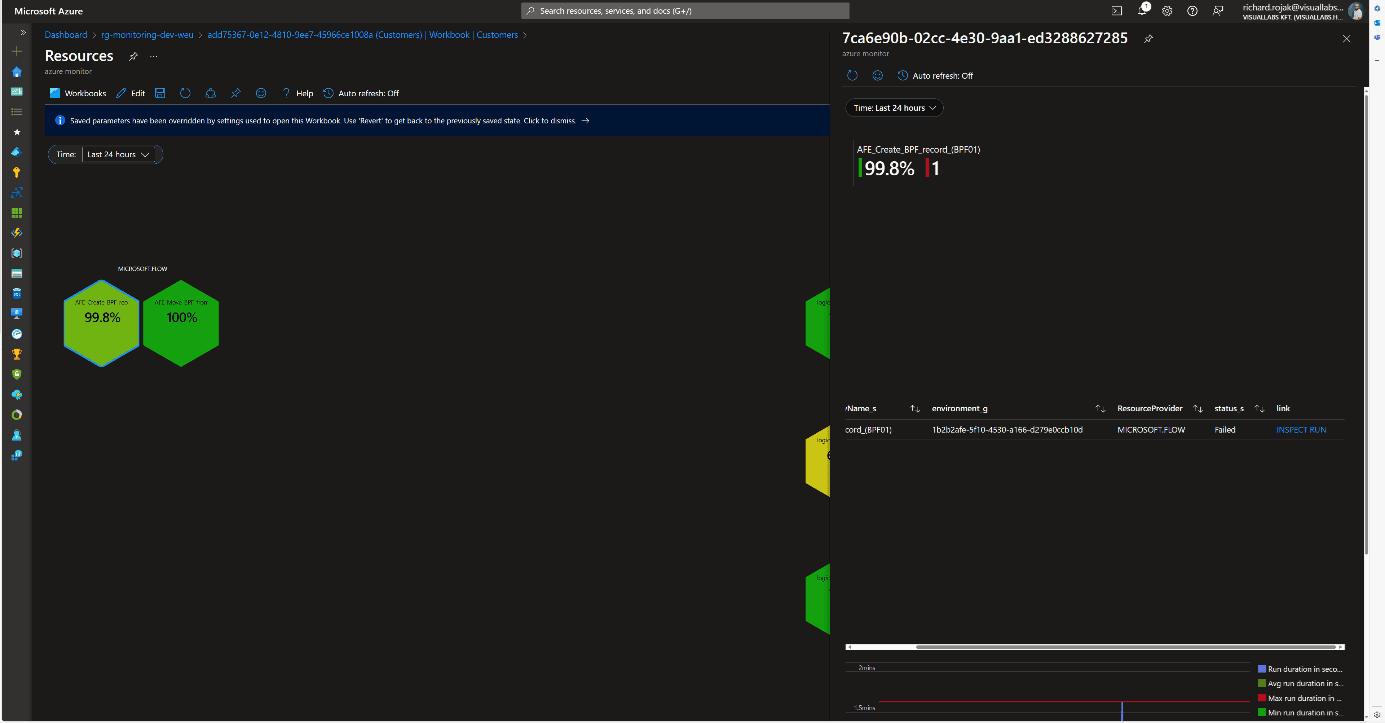
For Flows, the same information as for Logic Apps is displayed. The link also redirects to the specific run, but since it involves leaving Azure, logging in again is required because Dynamics falls outside the scope of Lighthouse.
Azure Function
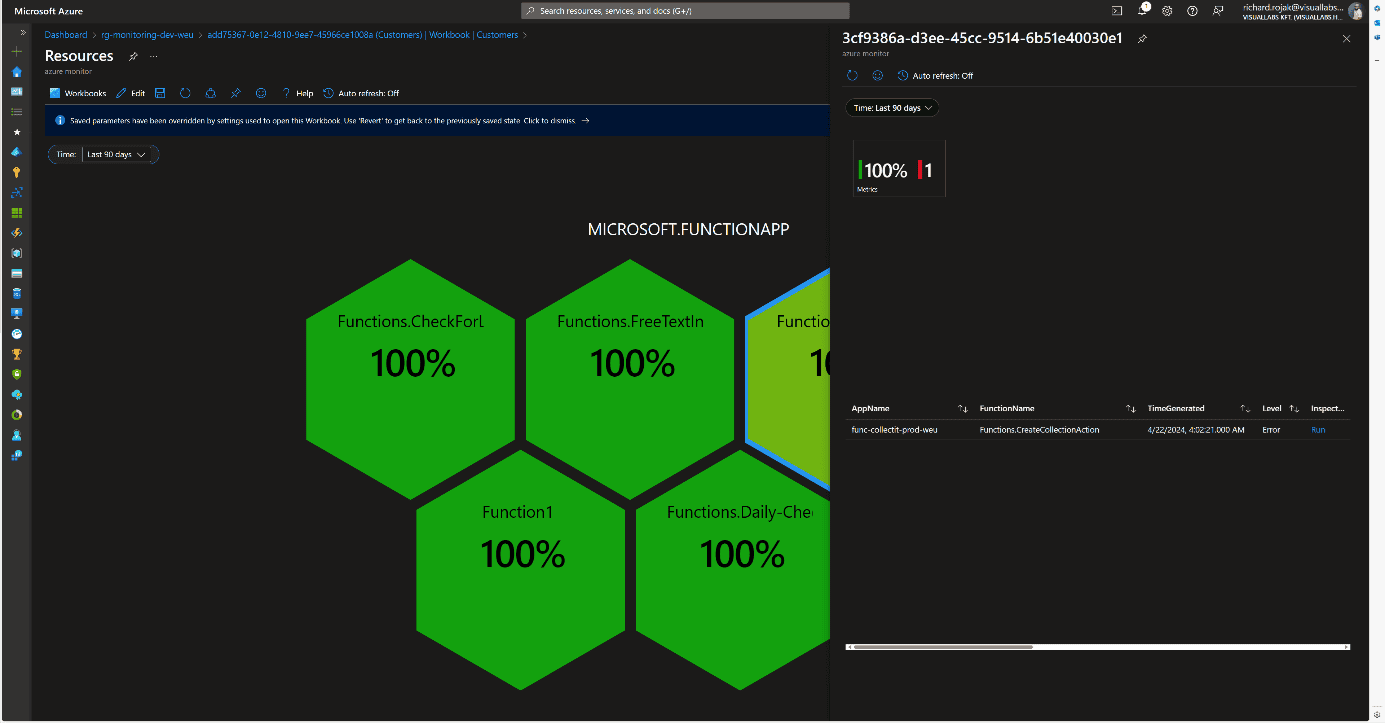
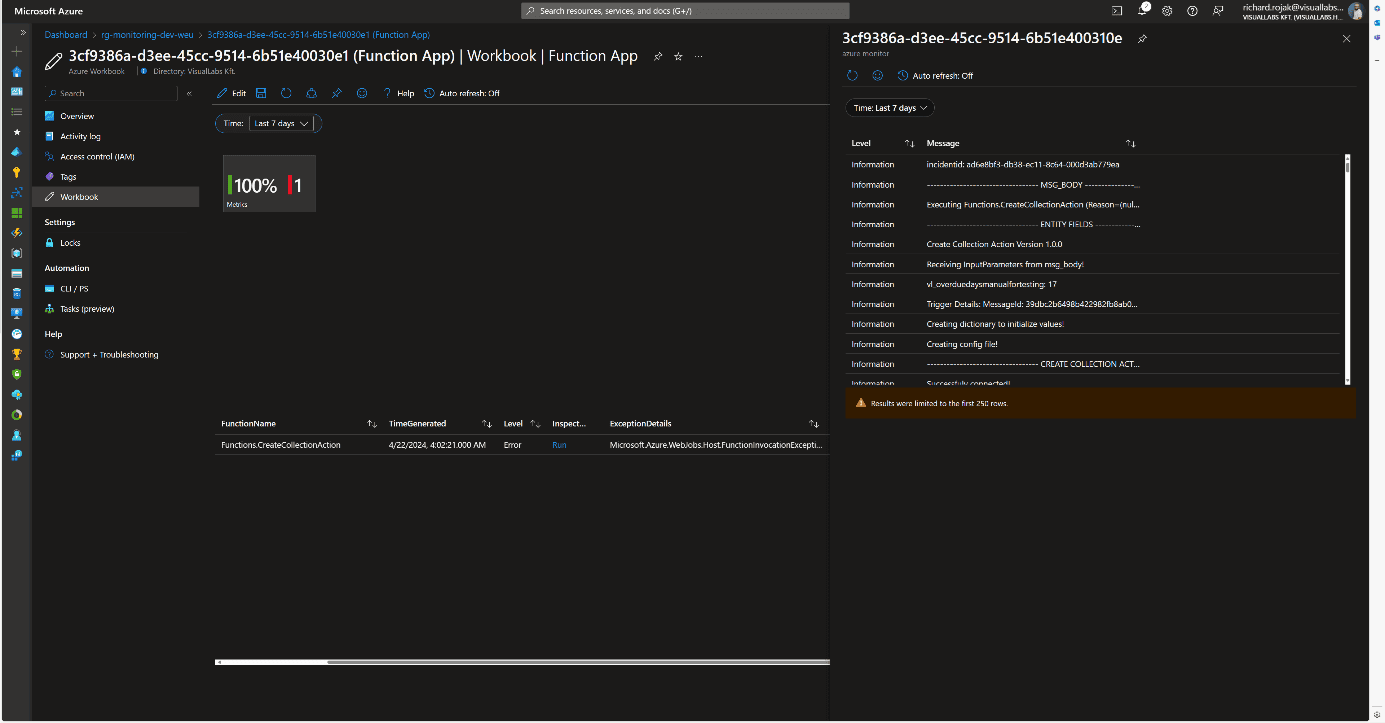
The structure is the same for Azure Functions, with the addition that the link redirects to another Workbook instead of the specific run’s Function App monitor page. This is necessary because only the last 20 runs can be reviewed on the Portal. For older runs, we need to use Log Analytics, so to facilitate error tracking, the unique logs determined by developers in the code for the faulty run are displayed in chronological order.
Consolidated View
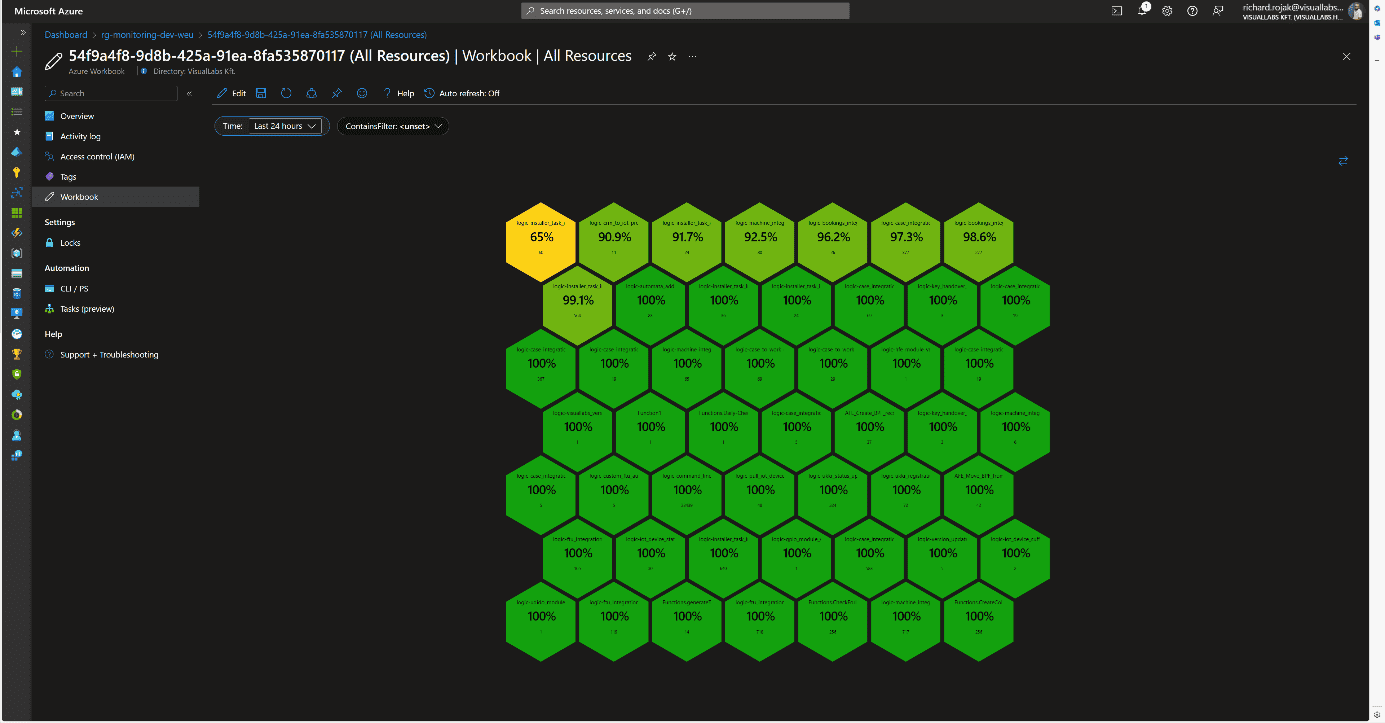
Since organizationally, the same team may be responsible for multiple projects, a comprehensive view was also created where all resources are displayed without type-dependent grouping. This differs from the Workbook of a specific project’s resources in that the honeycombs are ordered by success rate, and the total number of runs is displayed. Clicking on the percentage value brings up the previously described resource type-specific views.
Usability
This solution can be handy in cases where we want to get a picture of the status of various platform services in a centralized location. This can be realized interactively for all runs, except for Flows, without switching tenants or possibly different user accounts. Notification rules can also be configured based on queries used in Workbooks.
Advantages:
- The monitoring system and visualization are flexible and customizable.
- New resources of the same type can be added with a few clicks to already defined resource types (see: configuring diagnostic settings for Logic Apps).
Disadvantages:
- Custom log tables, visualizations, and navigation between Workbooks require manual configuration.
- Integrating Flows requires significantly more time investment during development and planning.
- Combining tables, separating environments and projects can be cumbersome due to different infrastructure schemas.
- Basic knowledge of KQL (Kusto Query Language) or SQL is necessary for queries.
Experience
The team that implemented the solution for the client provided positive feedback. They use it regularly, significantly easing the daily work of developer colleagues and error tracking. Errors have often been detected and fixed before the client noticed them. It also serves well after the deployment of new developments and modifications. For Logic Apps, diagnostic settings are included in ARM (Azure Resource Manager) templates during development, so runs can be tracked from the moment of deployment in all environments using release pipelines.

When I first started working at VisualLabs, during the first WSM (weekly standup meeting), where each business unit reports on their current weekly tasks, I noticed how many acronyms we use. As a member of the ERP team, the question arose in my mind: besides the fact that we use them, do we know exactly how they were developed and what they mean?
Everyone is now familiar with the term ERP (Enterprise Resource Planning), but few people know its exact origins and how it evolved.So I thought I'd gather together where it all started and what the main milestones were that helped shape the ERP systems we know today. As we look back in time, we will realise how deeply rooted this technology is in the modern business world.
In this blog, I've collected 7 milestones that helped shape the ERP system we know today.
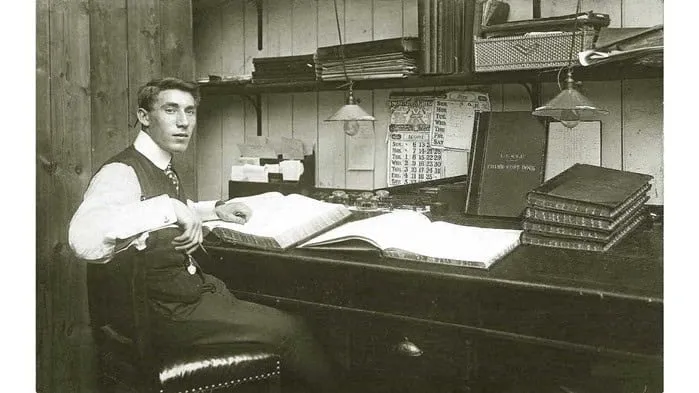
In today's world, it would be unthinkable for a company not to use some kind of computer system for its various processes. However, even before the advent of the computer, companies had to manage these processes (be it accounting or production planning) in some way. Let's take accounting as an example. Accountants recorded every single financial transaction on paper, by hand, in different books. And they were managed day by day, month by month. It is hard to imagine that companies often had rooms full of (general) ledgers and files, each containing dozens of transactions. And at the heart of it all was the accountants' most treasured possession: the ledger. It is hard to imagine how much work must have been involved in the year-end closing process and how many mistakes must have been made in the process.
- The birth of computers (1950s):
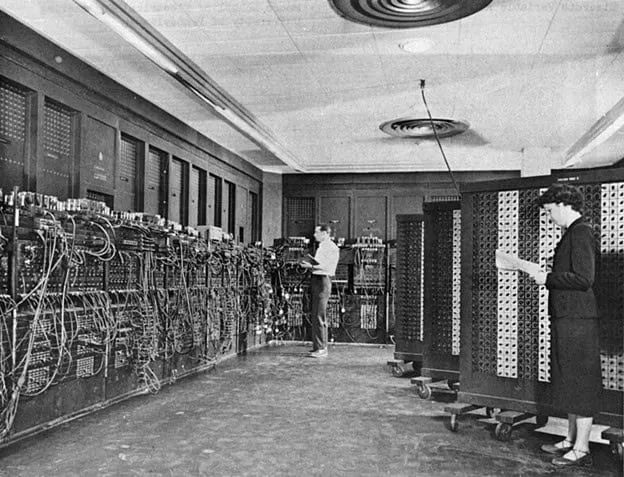
In the 1950s, with the birth of the computer - for which János Neumann laid the theoretical foundations - a new dimension opened up in the way companies operate and transform their processes. Although these computers were used in the 1950s mainly in the military and scientific fields - because of their large size and price - they soon became part of the business world thanks to continuous technological developments. These tools enabled faster processing and analysis of data and helped automate the activities of companies.
2. Inventory management and control (1960s):
One of the first milestones in the growing uptake of the computer and the realisation of its potential for business dates back to the 1960s. It was then that the manufacturing industry recognised the need for a system that would allow them to manage, monitor and control their inventory. The advent of information technology has allowed companies to integrate and automate their business processes. As a result, they have been able to improve the efficiency and accuracy of their inventory management. This was one of the first steps towards the emergence of ERP systems.
3. Material Requirement Planning (MRP I, 1970s):
The concept of MRP (Material Requirements Planning) first emerged in 1970 and was essentially a software-based approach to planning and managing manufacturing processes. The application of MRP focused primarily on planning and tracking material requirements. This approach allowed companies to predict more accurately the quantities and types of materials they would need in their production processes. MRP has enabled companies to manage material procurement and production scheduling more efficiently, reducing losses due to over- or under-pricing. This innovation has had a significant impact on the manufacturing industry and has fundamentally transformed the way companies plan materials. This approach helped to increase the efficiency and competitiveness of manufacturing companies in the 1970s.
4. Production Resource Planning (MRP II, 1980s):
The 1980s marked a major milestone with the advent of MRP II systems. While MRP focused exclusively on the inventory and materials needed to meet actual or forecast customer demand, MRP II now provides greater insight into all other manufacturing resources. By extending production planning beyond materials to labor, machinery, and other production resources, it gives companies much greater control over their manufacturing processes.
5. Enterprise resource planning systems (ERP, 1990s)
It was in the 1990s that the first true ERP systems were introduced (the term ERP itself was first used in the 1990s by the research firm Gartner).The ERP systems were a significant improvement over MRP II systems, as they focused not only on the full integration and automation of manufacturing processes, but also on the full integration and automation of business processes. Examples of such processes include purchasing, sales, finance, human resources and accounting. As a result of this full integration, companies are now able to manage their business processes in a single database. This has brought many benefits. The unified storage and management of information ensured access to accurate, up-to-date data. This improved decision-making processes and efficiency for companies. And the interconnected business areas helped them to make and implement coherent strategies. As a result, the ERP system became a 'one-stop-shop' that brought together and managed all corporate information.
6. Web-based functionalities with the advent of the Internet (ERP II, 2000s)I
n the mid-2000s, the role of the Internet in the business world increased and ERP systems adapted to this change. Systems began to incorporate customer relationship management (CRM) and supply chain management (SCM) functionality. With ERP II, the focus has been on user-friendliness and customisation. Modular systems were developed that allowed businesses to select and implement the components that best fit their operations.
7. Cloud ERPs (2010s):
In the 2010s, the emergence of cloud technology gave a new dimension to ERP systems. Cloud ERP solutions have enabled companies to host and run their ERP systems in the cloud instead of traditional on-premise deployments. This has offered significant benefits, including greater flexibility, lower costs and easier access to critical data. Thanks to cloud ERP systems, companies no longer have to worry about server maintenance or software updates, as these tasks are handled by their service providers. This allows companies to focus on their business goals and processes while ensuring that their systems are always up-to-date and available.
+1 The future of ERP:
And where is the development of ERP systems heading today? With the help of intelligent algorithms and artificial intelligence, systems are increasingly capable of automating and optimising business processes, reducing the need for human intervention. Data will continue to play a key role in the future, as companies are able to make better business decisions by analysing it more effectively. The integration of ERP systems with various IoT tools will enable real-time data exchange and real-time analysis to provide companies with faster and more accurate answers to support different business issues.

ERP systems also increasingly offer a personalised user experience and extensible integrations with other business applications and technologies. In the future, ERP systems will not only function as a tool, but will provide companies with real business intelligence and competitiveness, helping them to keep pace with the rapidly changing business environment and to stand out from their competitors.
Are you familiar with the world of ERP systems? Visual Labs can help you explore its potential.
Sources:
https://www.geniuserp.com/resources/blog/a-brief-history-of-erps
https://www.fortunetechnologyllc.com/history-of-erp-systems/
https://www.geniuserp.com/resources/blog/a-brief-history-of-erps
https://www.erp-information.com/history-of-erp.html#google_vignette
https://www.techtarget.com/searcherp/tip/MRP-vs-MRP-II-Learn-the-differences
https://www.business-case-analysis.com/account.html
https://www.britannica.com/technology/computer/IBM-develops-FORTRAN
https://business.joellemena.com/business/when-did-computers-start-being-used-in-business-2/

Depending on where a sales process is in the process, different functions should be available on a Subgrid on a form, which in practice means that you can add enquiries for a Lead at the beginning of the process, but they cannot be changed later in the Opportunity phase.A little technical knowledge is required to understand and apply this article, so this is recommended for Dynamics 365 CE app makers who are already comfortable in the Power Platform world.Default position:
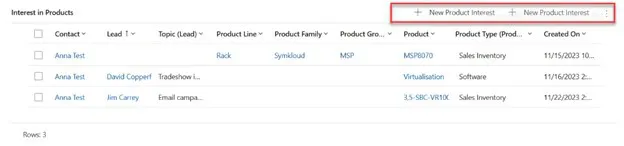
THE GOAL:
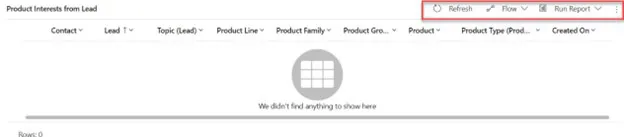
Tools used to solve:
- JavaScript (XRM toolbox - Web Resource Manager ajánlott) - WebResources Manager - XrmToolBox
- Ribbon Workbench - Develop 1 Ltd | Ribbon Workbench for Dynamics 365 & Dynamics CR
1. SOLUTION
We need to create a Solution, which we will load into the Ribbon Workbench. Into this Solution we need to load the entity whose SubGrid we want to modify. (It is important that when we add the existing entity to the Solution we do not import any other elements). The Solution name should always be built according to the following logic: Ribbon_VL_[entity name] e.g. Ribbon_VL_Product_Interest

2. Subgrid
The SubGrid must be named with a unique, identifiable name. Do not have the boxed auto-generated name you refer to later.
3. JavaScript
The JavaScipt below should be created as a js file (VS Code) and uploaded to the solution containing the Web resources.When creating the file, it is a good idea to give it the same name as the file name to make it easier to find later.
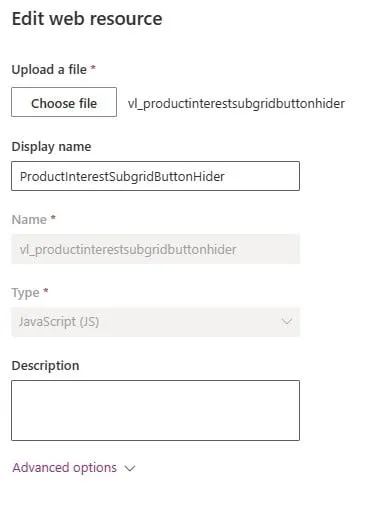
forProductInterestView: function (selectedControl) {console.log("start.forProductInterestView");"use strict";debugger;var currentGridName = selectedControl._controlName;console.log("forProductInterestView-currentGridName: "+currentGridName);var excludedPayRun = "subgrid_prodinterest"; //Name of the subgridif (currentGridName == excludedPayRun) {console.log("end.forProductInterestView.true");return false;}else { console.log("end.forProductInterestView.false");return true; }}
4. Ribbon Workbench
Open the Ribbon workbench and add the solution you created in the first step. Each entity has 3 ribbons. We need the Subgrid.
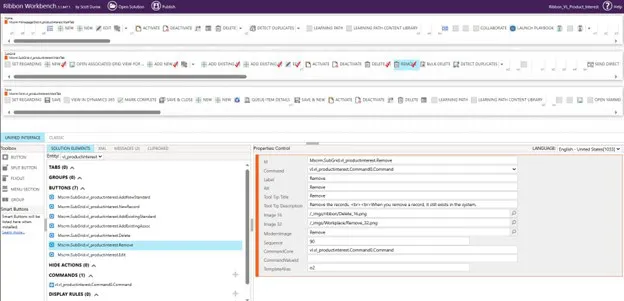
Select the button you want to uncheck by right clicking on it and press "Customise Button". A red tick will then appear and will be added to the Buttons section below. If it is already ticked, it means that it already has a command, you need to add a new command to it and you can skip this step.After that you have to add a Command, which can be done with the plus sign in the Commands section. The command should look like this.
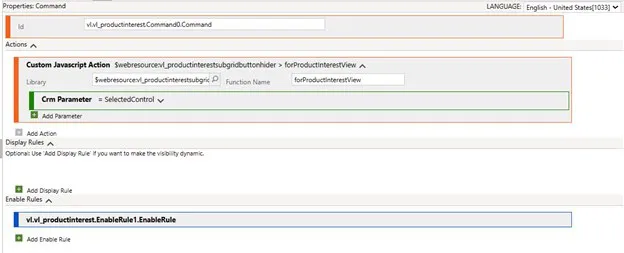
Explain:
- Library: the webResource you added to the solution (this is where the good name comes in)
- Function name: The name you gave it in JavaScript (before Function).
- CRM Parameter: What parameter to pass this is in this case the SelectedControl. This Control handles the SubGrids on the Forms, and any listing. PrimaryContol handles the Form.
Next, we need to add an EnableRules that hides the buttons.
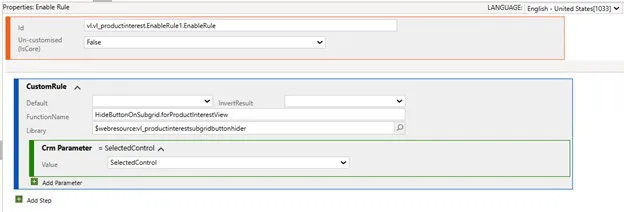
Explain:
- Library: the webResource you added to the solution (this is where the good name comes in)
- Function name: The name you gave it in JavaScript (before Function).
- CRM Parameter: What parameter to pass this is in this case SelectedControl
Only one step left before Publish. For the buttons, you need to specify what Command should belong to them.
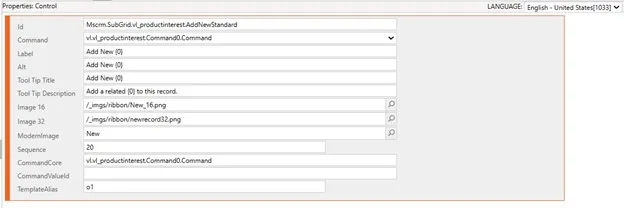
I hope you find this article useful and that we have been able to give you some ideas.

It's that time of year again, when Microsoft has released the first major bundle for its Dynamics 365 Business Central enterprise management system.
There are two major update packs a year, in April and October. In addition, smaller updates will also arrive on a monthly basis.As part of the Wave 1 release, the company has announced a number of new features, in addition to the usual user experience improvements, this year there is a big focus on the 'Project Module' and further enhancements to the Artificial Intelligence line, with the addition of functionality to Copilot, which was introduced last year.
In this article we'll take a closer look at what we think are the most exciting features of Wave 1.

AI & Copilot
For some time now, artificial intelligence has been increasingly embedded in all areas of life, including business. Microsoft's Copilot has given Business Central its first AI features, which will be further enhanced with the latest version.
Copilot, for example, makes it easier to fill out sales order lines by entering a few simple criteria.

The analytical views generated by Copilot also make it possible to produce increasingly faster and more accurate reports.

It generates an analysis in seconds based on the instructions given:

The system also has a Copilot chat feature, where you can ask the AI, for example, about mapping a process within Business Central, and get a very useful - step by step - description back:

What's unfortunate is that the new features still don't support the Hungarian language, so for the time being, English-speaking users are preferred.
Inventory cost recovery tool
We have a completely new interface that extends the range of cost recovery methods we are already familiar with.

But what exactly do we get?
With the new tool, you can check and track the cost recovery for all items or only selected items.
You can now easily identify problematic articles and run automatic corrections for the rest without any problems.
It should be stressed that the new tool does not replace existing processes, but instead helps troubleshooting and improves system performance.
Multi-line text export/import with Config. package
Fields of type BLOB, which usually contain multi-line texts, have been added to the optional fields in the config. packages thanks to the new update.
A good example is the 'Job Description' field on the Sales Invoices page, which can now be imported from Excel to Business Central. This is particularly important as the content of this field is also displayed on the invoice screen.

Hibaüzenet adatainak megosztása másik felhasználóval
Sokszor találkozhatunk hibaüzenetekkel a rendszer használata során. Az üzenetek nem mindig egyértelműek az átlag felhasználó számára, ezért a segítségkéréshez szükség lehet további információkra.
Ezen információk összegyűjtése időigényes folyamat lehet, főleg, ha fejlesztő bevonására is szükség van.
Ezt a folyamatot könnyíti meg ez az apró (de nagyon hasznos) újítás, mely lehetővé teszi, hogy az összes szükséges hibaüzenetet (a szükséges azonosítókkal) két kattintással továbbítani tudjuk a megfelelő személynek emailben vagy Teams-en.

New Excel reports
Microsoft has added 8 new Excel reports to the system this year, supporting financial, sales and purchasing processes. These reports allow reporting without the need for a developer.

Users can also use the latest reports as templates or enhance them to present their business data in the best way.
For the time being, the new reports have the suffix preview.
Project module updates
The project module has been given special attention this year.
In addition to the new fields that can be displayed on the Projects page with Personalisation, the details panel on the right-hand side of the information panel has been expanded.
The invoicing process for projects has been simplified from start to finish. With the new Query project design rows action, you can now add project design rows from multiple projects to a single sales invoice, but also invoice projects to multiple customers.
You can now add items to be assembled for ordering to projects, similar to sales orders. In this case, an assembly order is automatically created in the background, containing the required ingredients and their corresponding quantities.
A project archiving function has also been added, which works in a similar way to the archiving of sales and purchase orders.
Field Service and Business Central integration
Businesses using Field Service can rejoice. The new integration will make data communication between the two systems smoother.
Users can manage their work orders, service task progress, resource scheduling and consumption management on the Field Service side. Once a work order is completed, the integration allows for easy transfer of the necessary data to Business Central.
The integration also facilitates billing processes. Users can now generate accurate invoices based on service activities performed and consumption recorded on the Field Service side.
New role available for claims management
The role for claims management has been expanded. We get new lists, tiles and a revamped menu with an embedded action menu.

Automation of calls
The new update includes a major enhancement to the call handling feature. It is now possible to automatically send notices to customers about overdue debts based on predefined conditions.
You can set filters for the whole process or for individual transactions and attach a PDF of the receivables to the emails.

Connect the Business Central environment to the Power Platform environment
We can integrate Business Central with a range of Power Platform and Dynamics 365 products. But with the new update, we have the ability to connect environments through Business Central's admin center.
This will allow BC to inherit the settings of the associated Power Platform environment, including the encryption keys managed by the customer. This linked environment serves as the default target for other Dynamics 365 and Power Platform products such as Sales or Power Automate.
Worksheets now also available on mobile
It is increasingly important that more areas of Business Central can be accessed from mobile as more and more users choose to work this way.
Worksheets, such as the various diary accounting pages, can now be accessed from mobile, something that was previously only available from tablets and desktops.

Developments in warehousing and stock management
Some changes to stock and inventory management have also been made based on regular user feedback:
- We can now assign a portion and package number to existing tracking lines
- We can manage warehouse item tracking queues
- Warehouse items page inherits the name of the item in the item carton

If you're interested in further developments or just want to understand more about the article, feel free to contact the Visual Labs team and we'll be happy to help.info@visuallabs.hu

Introduction
In today's post, we want to compare Dynamics 365 Business Central ERP in the cloud (or Software as a Service, SaaS) and on-premise (hosted or on-premises) from several perspectives, providing helpful perspectives for business decision makers to consider the complexities of ERP implementation. Microsoft sells two ERP systems: one is the aforementioned Business Central; the other is Dynamics 365 Finance and Operations, designed for large enterprises.

Every day we hear that more and more business IT solutions are "running in the cloud" or "going to the cloud". In our personal lives, cloud-based software solutions are also becoming more and more common. Just think of our data stored in Google Drive, iCloud or Dropbox.
As business leaders, we can also choose to implement our enterprise resource planning (ERP) system in the cloud. Flexera forecasts that the global cloud ERP market is estimated to grow from $64.7 billion in 2022 to around $130 billion by 2027. This represents an annualised growth rate of 15%. Covid has also given a big boost to the expansion of cloud ERP systems. Therefore, cloud ERP systems have great potential.Before we start implementing our Business Central system, we first have to decide whether we want to run the software in the cloud or store the data on our own server.
Costs
A cloud-based solution has lower initial costs, as it is usually subscription-based and does not require a large initial investment. Costs are more flexible and easier to manage, whereas a deployed version has higher upfront costs, including hardware, software, installation and maintenance. In addition, ongoing operations (infrastructure and staff) and upgrades can be costly.
Data storage location
The most fundamental difference between cloud and terrestrial systems is the physical location of the data itself. With cloud-based Business Central, your company's data is stored in one of Microsoft's data centres. The data stored in this way complies with EU data protection directives, including the GDPR. In addition, Microsoft guarantees 99.99% availability of the Business Central application. This means that the system is only down 0.01% of the time, and then only after hours at the most.
Developments
The company has to have unique solutions. These can usually be solved by extensions or custom development. Modern cloud solutions offer more and more customisation and integration options. It is also possible to develop source code directly in on-premise environments. But the end result is the same: in both cases, you have the flexibility to extend out-of-the-box functionality with the careful expertise of a systems integrator like VisualLabs.
Performance and scalability
The performance of the new system is a key consideration when choosing a solution. For the cloud, Microsoft invests significant resources to ensure maximum availability and speed for its users. So businesses do not need to pay special attention to this.For on-premise solutions, system performance is more dependent on the infrastructure installed/leased by the company. As the Business Central installed requires hardware of optimal size and power. Also, the company itself has to be responsible for performance issues, not the availability as a basic requirement for a cloud-based service guaranteed by Microsoft.
Maintenance and updates
With a cloud-based system, software updates are done automatically by Microsoft, requiring less IT activity from the company. In this way, Microsoft ensures that subscribers have a modern, up-to-date or evergreen system in every respect. The timing of these updates can be flexibly set within an update window.In the case of on-premise versions, these have to be done by the company's IT team, which requires more resources. With on-premise, there is a risk that the latest software updates are not installed, leaving users 'stuck' with an old version. The result will be outdated software over the years, which could mean another IT project in the life of the business to replace.Whether we are talking about cloud-based or on-premises versions, it is highly recommended to test and try out new updates in a dedicated test environment before deploying them in a live environment. There are a number of new features in these updates that should make the daily life of users easier. Twice a year, Microsoft releases a major update package with a range of new functionality.
Data security
The most important consideration when choosing software is that your data is secure. Microsoft provides built-in backup and disaster recovery solutions that enable faster and more reliable recovery. This way, an outage in a Microsoft data centre is not noticed by the end user. In addition, Microsoft also enables up-to-the-minute data recovery for up to a month.With an on-premise solution, the company has full control over data security and access management, which means more control but also more responsibility. They can more easily comply with regulatory and legal requirements that require data to be stored on-site, especially in industries with strict data protection regulations.
Limitations of the on-premise version
The on-premise version has several limitations compared to the cloud-based solution. An interface called AppSource is not available in the on-premise version. It contains thousands of applications that can be added to the Business Central functionality. Many of these are available for free.Power Platform applications (e.g. PowerApps, Power BI) cannot be natively integrated with on-premise Business Central. This requires the creation and maintenance of a data gateway.In addition, the list of features that Microsoft will make available in the on-premise version is growing. These include the possibility of integration with Microsoft Teams or the Shopify webshop engine. Microsoft's AI solution Copilot is also available exclusively in the cloud-based Business Central version.
Conclusion
The table below summarises the main claims of our post:
The final decision always requires careful consideration by the organisation facing digital transformation. Visual Labs offers and implements a cloud-based Business Central for its clients, which, based on years of experience, is a well-established model that delivers the benefits detailed above in the short term. If you need help with ERP system implementation, please contact us!
