


For our customers, it is important that when we deliver a new version of their existing IT system, we also provide a release note on the content and functionality of the released package. At Visuallabs, we constantly strive to meet our customers' needs to the maximum, all while simplifying our own workflows and increasing our administrative efficiency. We are supported in this by the Bravo Notes available in DevOps. Using this plug-in, we produce a unique yet standardized Release Note with each new development package delivery. This allows us to meet our customers' requirements in a fast and standardized way.
What is needed to do this?
By following a few simple principles in our delivery processes, the documentation we already produce provides a good basis for generating standard version documents in a few steps for our releases or bug fixes.
How do we document?
- The conventions for using the various purpose fields available on a given DevOps element will be strictly adhered to and filled in in a way that is appropriate for the document being generated.
- User Stroy descriptions are prepared in a standard format. This allows us to provide standard quality for our customers and to build in automated document generation.
- Tickets are sorted by transport unit. This helps when responding to multiple business challenges from the customer at the same time. Documentation of delivered enhancements and system changes can then be categorised in one document.
Using Bravo Notes
Bravo Notes provides technical assistance to help you meet these requirements with the right customisation.The main functions we use:
- Compiling content: there are several options to choose from when selecting items from DevOps. We use Query most often among the options shown in the screenshot below, because the multiple filtering criteria allow us to select relevant elements more efficiently, thus making the documentation more precise.

- Template: In Bravo Notes, we have created various templates to organise the news into a proper structure.
Main units of the template developed:
- In the case where several delivery units or business processes are involved for a system release, the relevant descriptions are grouped together in the document.
- A further organizing principle in the template is that new developments are shown in a feature-by-feature breakdown, and solutions to bugs are also shown in a separate unit. This makes it clear which supported feature a given release item refers to, whether it is a new development or a bug fix.
- Use parameters: parameters based on business processes allow you to customise the generation of documents. During generation, you can change the title, date, release date and add comments to the document. You can also specify the applications and resources involved, for example, which business area or environment is affected.
- Display of document units and headings based on a set of rules: it is handled in the template to display only the relevant headings and document parts; e.g. if there was no error correction in a given delivery unit, its heading is not displayed either.
- Fields used in the template: as defined above, we provide easy-to-read descriptions for the released developments. The consistent documentation of the DevOps tickets used in the design or development process allows this to be done quickly and in a standardized way. The content of the fields defined in the template about the tickets is automatically included when the document is generated.
- Export: After generation and verification, we export your document to PDF format.

Testimonials: Overall, it is therefore important for our customers to receive detailed and business-relevant documentation on the new versions provided for the systems they use.We are also trying to simplify our own workflows.The Bravo Notes module integrated into DevOps supports us in achieving these goals.With this plug-in, we create customized yet standardized Release Notes with each new development package delivery. This allows us to meet our customers' requirements in a fast and standardised way, providing them with the necessary information and transparency on system changes and enhancements.

IT terms in plain English – a guide for beginners
When you get your first job in IT, you may be surprised by the number of English words and abbreviations your colleagues use in everyday conversation. In your first meeting, you may not understand half of the topic, try to listen wisely, and then quietly ask a sympathetic colleague what the abbreviation means…
Of course, in a few months you’ll get the hang of it and you’ll understand and even start to use these terms yourself. But then your partner may tell you that he or she is annoyed by the mixed English-Hungarian language when you talk about your work; or your child may ask you what a package is.
Or maybe you’re a client who’s ordered a new system implementation from an IT consultancy, and there are these consultants who use incomprehensible acronyms when talking about the project. For you, too, we’ve put together the following article, in which we’ve tried to collect the most common unfamiliar terms we use.
These words either don’t have a translation in Hungarian or sound strange in a mirror translation, so nobody uses them in Hungarian (kick off meeting = firing meeting ?!?).
So here is the collection without the need for completeness:
kick-off – “When is the kick-off?” In English, the kick-off. A meeting at the beginning of a deployment project where users and deployment consultants meet to lay the groundwork for working together and discuss the planned timeline for the project.
cutover – A transition or switch from an old system to a new system. During a cutover, the new system is brought up to speed and the old system is usually shut down permanently.
workshop – An opportunity for VL consultants to assess the client’s business processes and demonstrate what the system can do by default. Not training, more conversational.
SDD – Solution design document. A detailed technical and functional description of how the business processes and user needs that have arisen will be implemented in the new system.
UAT – user acceptance test. We (VisualLabs) will do the necessary development, set up the new system, prepare the process descriptions, then ask the client to test the processes before going live and give feedback on whether the system is suitable for them, whether it covers the business processes of the company including the rare cases. This is UAT.
go-live. The date from which users start using the system with ‘live’ data. For ERP systems, usually January 1 or the first day of the quarter.
timeline – project schedule
package – data package that is loaded into the new system, e.g. customer list
implementation – implementation of a new IT system
delivery – ‘delivery’ of a system implementation project
support – Once users start working with the new system, we support them if they have questions or encounter error messages. We will resolve any issues that arise (see below).
hypercare – The hypercare period is the few weeks after the implementation of the new system. The purpose of this period is to ensure a smooth integration of the new solution into daily operations. During this period, we provide priority support to our customers to ensure that systems run smoothly and users receive rapid assistance.
issue – “Did you see a new issue come in?” Error ticket, user issue.
backlog – A backlog is a list of all tasks, features, bug fixes, or development needs that need to be completed during a project. There is a project backlog and a personal backlog where you can prioritize your own tasks.
workaround – “Is there a workaround?” A workaround to achieve the same result in the system, possibly with more clicks.
D365 – Short for Microsoft Dynamics 365. Microsoft Dynamics 365 is a cloud-based enterprise resource planning and customer relationship management (ERP and CRM) system that provides integrated solutions for managing finance, sales, marketing, customer service and operations. The main applications of D365 are Sales, Customer Service, Business Central, Finance and Operations.
ERP – Enterprise Resource Planning system, an integrated enterprise resource planning system. A program that manages accounting, warehouse management, invoicing, cash management in one place. The way it works is that when a truck arrives at the warehouse and the warehouse clerk picks up the goods, the finance department on the floor can see the numbers.
F&O – Dynamics 365 Finance, formerly known as Axapta or Finance&Operations, is Microsoft’s enterprise management system for large companies.
BC – Dynamics 365 Business Central, also known as Navision, Microsoft’s business management system for small and medium-sized businesses.
SLA – “What SLA have we agreed?” Service Level Agreement. A contractual term in which the service provider (VisualLabs) and the customer define the expected performance levels of the service provided, such as how long it takes us to resolve an issue and how long it takes the customer to deliver data feeds to us.
localisation – Microsoft ERP systems are US programs. Localization is an add-on that includes the Hungarian translation of the program and add-ons to the program to ensure compliance with Hungarian tax and accounting rules (e.g. NAV Online Invoice link, VAT return export).
PROD environment – ‘Live’ environment in the program where real data is booked. Its opposite is the TEST or Training environment, which is used for educational purposes. Here you can try out new functions, test settings and check the results of certain bookings without risk.
If our customer has a new business need that they want to implement in the IT system, we classify that task as config or dev.
config – Requirement that can be implemented by configuration (by changing the system settings).
dev – development = Development is needed to implement the need, so the developer modifies the existing program by adding new fields, new buttons, new functions.
integration – a link between two different programs that allows data to be transferred so that, for example, partners do not have to be entered twice, into two different systems. For example, suppose a company has a CRM system in which it creates a customer and generates a quote for him. After accepting the quotation, the customer is automatically created in the accounting software, and from the quotation in CRM, a sales order is created in the accounting software, and then a sales invoice. The integration data transfer can be automatic (e.g. daily MNB exchange rates are automatically loaded into the accounting software) or manually triggered (CRM users can have the accounting software generate an invoice at the push of a button).
API – API (Application Programming Interface) is the link itself that transfers data between the two systems in the integration. To use a restaurant analogy, the waiter is the API in the relationship between the customer and the chef, communicating between the two parties.
repo – code repository. A repository of code for developments.
We hope that this article has helped you to navigate more easily in the IT world and to communicate more confidently in professional conversations.Can you add anything to the above? Leave a comment on our LinkedIn page: https://www.linkedin.com/company/visuallabs-kft/about/!

Want to get an insight into the daily life of a close-knit and enthusiastic team? Read our blog post about the Visual Labs ERP team! Find out how we spend our colourful and varied days, what we have in common at work and outside of work, and how we support each other in every situation. Keep scrolling to discover why our team is so special.

The Visual Labs ERP team is a very cohesive, fun team. We implement, develop and support enterprise management systems. Fortunately, our work is extremely varied, no two days are the same. We talk to customers, answer questions, bug reports, develop solutions for new needs, develop and test. We assess our new customers' business processes online or in person, and train users in English or Hungarian.
Who are we?
Our team members come from all over the Danube region. We include recent graduates and people with 15 years of professional experience. Our clients prefer to call us programmers or developers, but the cold, IT-savvy, economist-functional consultant inside is what we call them.
Everyone in the team has their own specialisation and super skills. Someone can build a cool chatGPT of their own, others are experts in creating new ERP environments, but we also know which of our partners to ask when it comes to VAT or when the configuration needs a final thorough check.
We're proud to have three of our team in the parent camp.On office days we get together to be in at the same time. Then we sit in a pile near the team's own houseplant. It's hard to decide if it's the 'ERP palm' or the team growing faster.

There's always a good atmosphere in the office and we laugh a lot together, whether it's at meetings, a cigarette break or swapping wallpapers. Several of the team are also hobby baristas who are always happy to make you a nice (or not so nice) cappuccino.
Regular meetings
We start the week with a WSM (weekly standup meeting), where after a quick debrief we present to the company the progress of our projects and the tasks and milestones for the week ahead. We also have a quarter-hour DSM (daily standup meeting) every morning, where we can ask each other for quick professional help, list our daily priorities, or volunteer for a task that has just fallen in that we don't have time for. Fortunately, we have a very good team spirit and proactively support each other to ensure a balanced distribution of tasks.
We end Friday afternoon with a one-hour sprint round meeting to discuss the week's events and lessons learned, review the progress of our projects, identify next steps and prepare for the WSM on Monday morning.
Once a month, we have the opportunity to attend a coaching session where we can talk through the issues that are bothering us and our current stuck points, whether they are work-related or personal.
The monthly team retro meeting is a completely offline session where we 'process' together what happened in the past month, looking at what went well and what went wrong. It's a great opportunity to give each other feedback and draw lessons on how we're doing in order to make the next time even smoother for working together and delivering projects.
In our bi-weekly knowledge sharing sessions, we try to share this kind of knowledge with other team members. Our most recent knowledge sharing sessions have included topics such as using ChatGPT and building your own GPT, new Microsoft ERP releases, but also working together on the ERP business aspects of the organisational level changes.
We also have weekly so-called customer status meetings with several of our customers. But sometimes, on a case-by-case basis, it is easier to discuss an announcement with a screen-share - we are available for that as well. During these calls, we can discuss support issues that have arisen in the past, new needs that have arisen and our proposed solutions to these. We have the same team of experts to guide our customers from the sales phase through implementation to operation. This ensures that, even during the operational phase, the customer's request for a solution is handled by an ERP expert who is fully familiar with both the customer and the solution delivered.

"Is everyone in this team a basketball player?"
It can be an odd sight when I and two of my 190cm tall "bodyguards" arrive at a new client's premises for a demo or consultation. We're not basketball players, but our average height is over 180 cm 😀 Several team members have a professional sporting background: we have handball players, footballers, canoeists, bowlers and marathon runners, but nowadays we mostly go to the gym. We try to make sport part of our week, alongside work. And on our team-building evenings, we test our skills in pub sports or poker, although unfortunately Dani is unbeatable at all of them.

Party planning committee
In addition to team events, we are also happy to take part in company events, even as organisers. Two members of the ERP team founded the Party Planning Committee, which for example organised a carnival party with a doughnut competition and a fun quiz. The winning chef in the cooking competition we organised was also from the ERP team (but there was no bunting). The rest of the team played beach volleyball while cooking.


Summary
As we have seen, Visual Labs' ERP business is not only made up of experts who are at home in the world of ERP systems, but also a close-knit community where work is combined with shared experiences and personal development. We are proud that everyone contributes to the diversity and strength of our team, whether it's a deep knowledge of different disciplines, a background in sports or even the art of coffee making.
Your time here will not only give you an insight into the ins and outs of ERP systems, but will also be part of a supportive environment where team building and social experiences are paramount alongside professional growth. The Visual Labs ERP team is growing dynamically, as is our office's famous ERP palm tree - and both symbolize the continued development and growth of our community.
Thank you for joining us for this brief glimpse. We hope you found it inspiring to read about our team, and maybe one day you'll be a part of the Visual Labs community too!
Have you ever wondered how you can efficiently manage a business that operates in multiple currencies? Dynamics 365 offers a seamless solution for handling such scenarios.
Changing the default currency in D365 to your local currency can streamline financial transactions and reporting.
Dynamics 365 and Dataverse offer robust support for multiple currencies, allowing for flexibility in international business operations. When setting up an environment, you choose a base currency, such as the EUR. However, if your users operate in different currencies, they can adjust their default currency settings.
To update the default Currency, the user needs to follow these steps:
Step 1: Open your Dynamics application
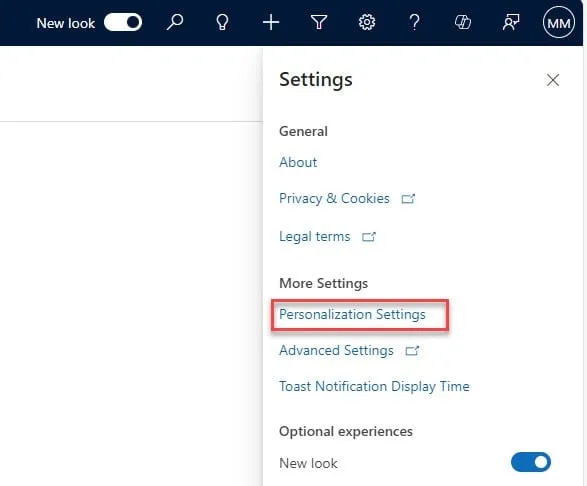
Open any model-driven app, such as Sales Hub. Click on the gear icon and open Personalization Settings:
Step 2: Update the Currency Under the ’General’ tab, choose the desired local Currency and save the changes.
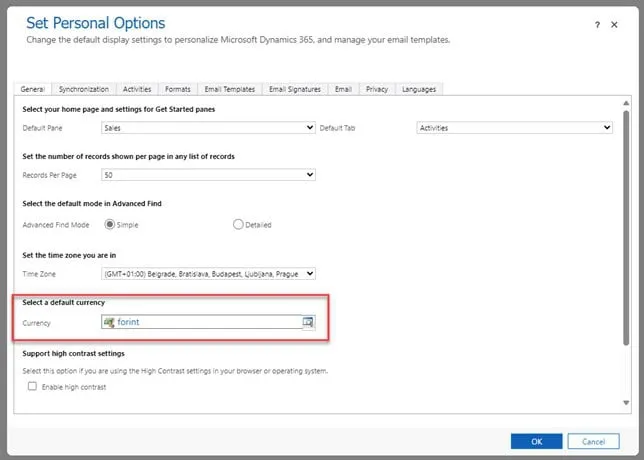
After saving, whenever the user opens an entity form which contains a Currency type field, their selected Currency will be visible.
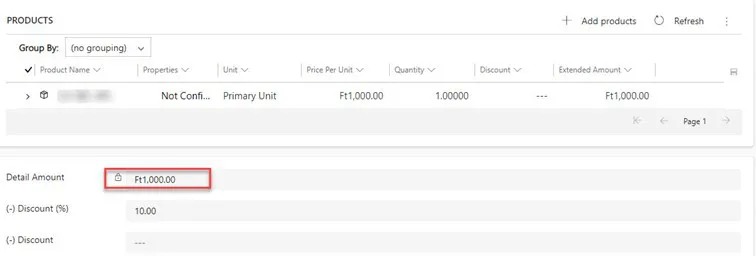
However, this only modifies the local currency, as the base currency is selected at the time of the environment setup and thus cannot be modified later. It is good to know that system administrators can set the default currency of users as a bulk operation.
- How the Currency field stores data
In Dataverse, data is structured with two distinct columns for currency values: one column for the local currency and another column for the base currency. These two columns are automatically created upon adding a Currency type field to a record. For instance, the ‘Estimated revenue’ field on the Opportunity has two underlying fields in the Dataverse: ‘Estimated Revenue’, which captures the value in the user’s local currency, while the column for ‘Estimated Revenue (Base)’ stores the field’s value in the base or organization currency. How does Dynamics calculate the conversion between the local and the base currency? To account for the different values of currencies, Dynamics uses the underlying Currency table, where each currency available has its own record. You can reach the Currency table by opening the Advanced Settings:
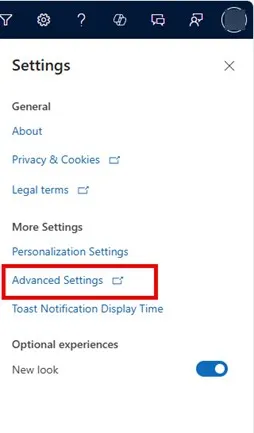
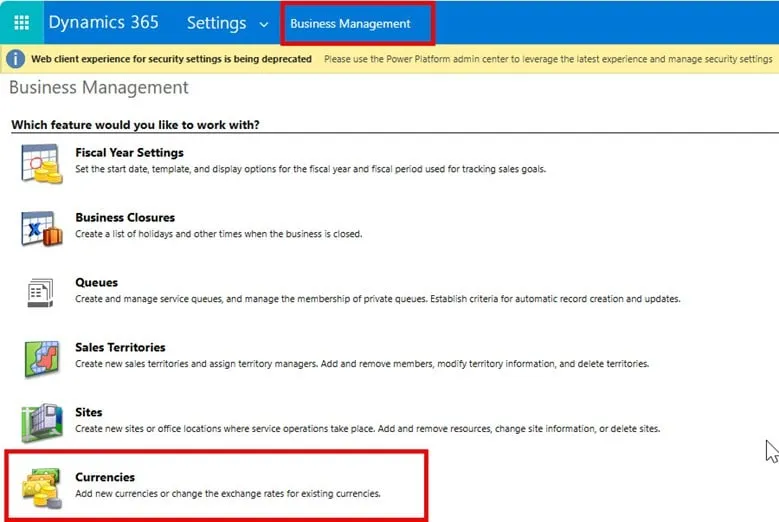
And navigating to the Business Management section and selecting Currencies.
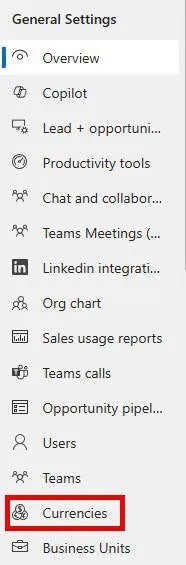
However, if frequently modifying the exchange rates is part of your organization's day-to-day work, you can also modify your application so that the Currency table can be reached directly from the menu.
Moreover, you can set up an integration with an exchange rate provider. This integration ensures that all financial data reflects the most current rates, reducing the risk of errors and improving the accuracy of your financial reports. This is particularly beneficial for businesses that deal with multiple currencies and need real-time data to make informed decisions.
Summary
The currency type field in Dynamics 365 is a powerful tool for businesses operating in multiple currencies. By setting a local currency as the default and understanding how currency data is stored and converted, users can better manage their financial transactions. Additionally, integrating with an exchange rate provider can further enhance the accuracy and efficiency of your financial operations.
In part 3, I’m going to give you a step-by-step description of the implementation process of source control in Power BI. This can be divided into 4 parts:
- Modify settings in Power BI Desktop
- Download & Install necessary softwares
- Set up environments
- Use it!
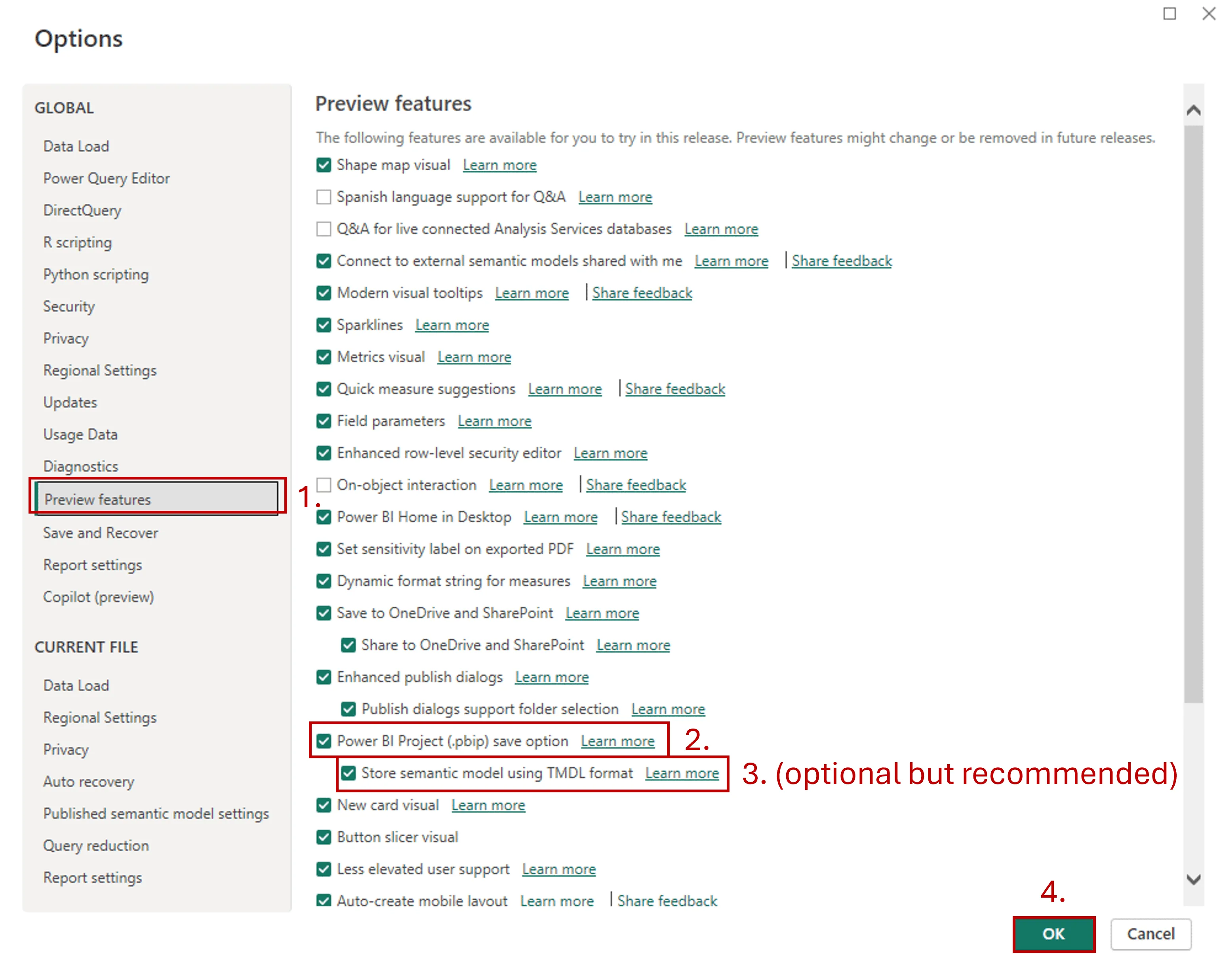
Step 1 - Modify settings in Power BI Desktop: Enable preview feature: Power BI Project (*.pbib) save option
- Open Power BI Desktop
- Go to Options and settings and select Options

3. Click on Preview features and enable Power BI Project (*.pbib) save option +1 optional) I’d recommend ticking the boksz next to Store semantic model using TMDL format 4.Hit OK
And now we can move to Step 2. Step 2 - Download & Install necessary softwares At VisualLabs we decided to use VS Code but you can do the basics in Power Shell as well. The reason I prefer VS Code is that you can have a visual interpretation of your project (track all the branches, merges, etc at the same time).
- Download and install VS Code - https://code.visualstudio.com/download
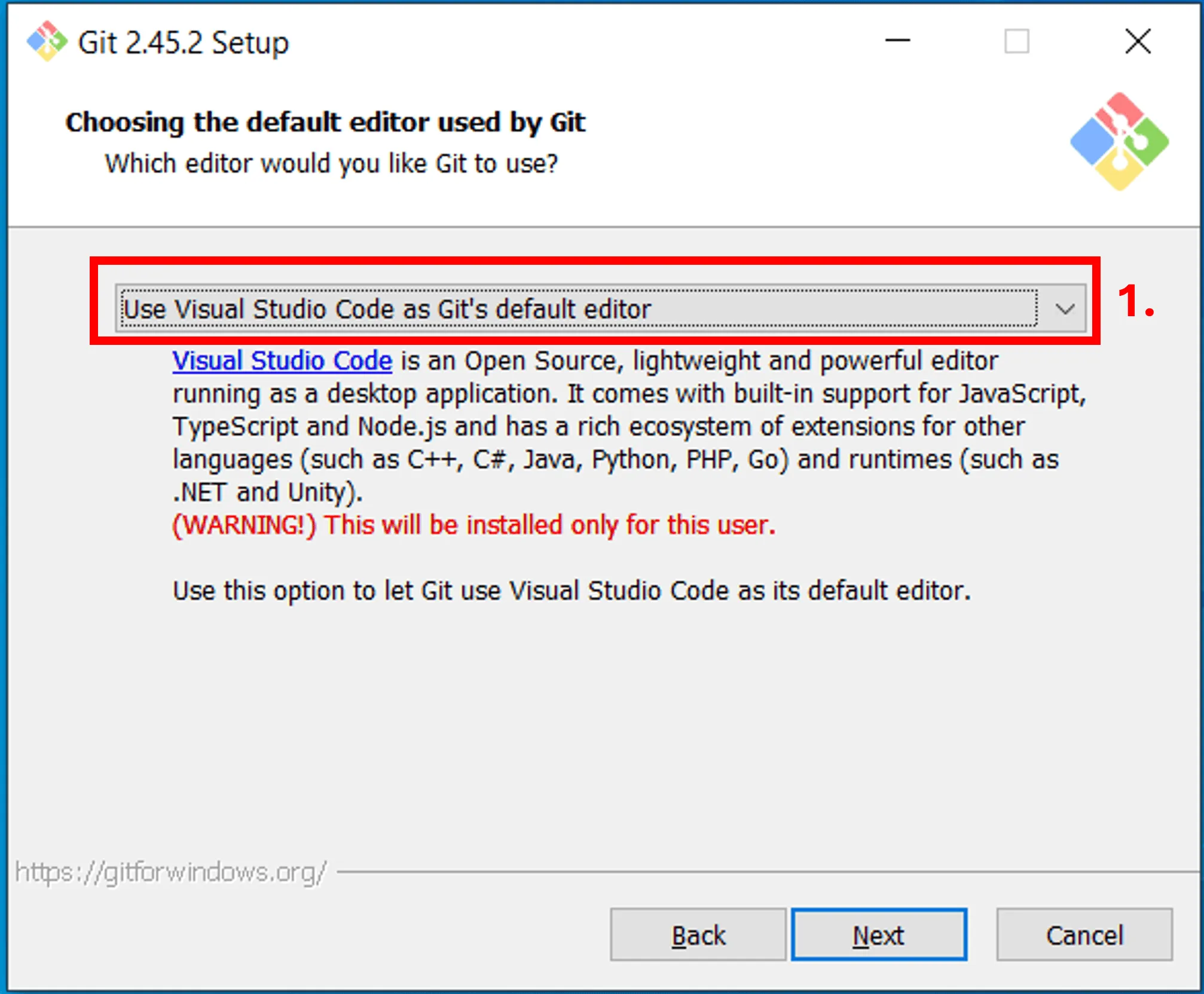
Feel free to install it with the default settings. 2. Download and install GIT. You can download it from here: https://www.git-scm.com/downloads Feel free to install it with the default settings, the only thing you can change is the default editor, which you can set to Visual Studio Code.
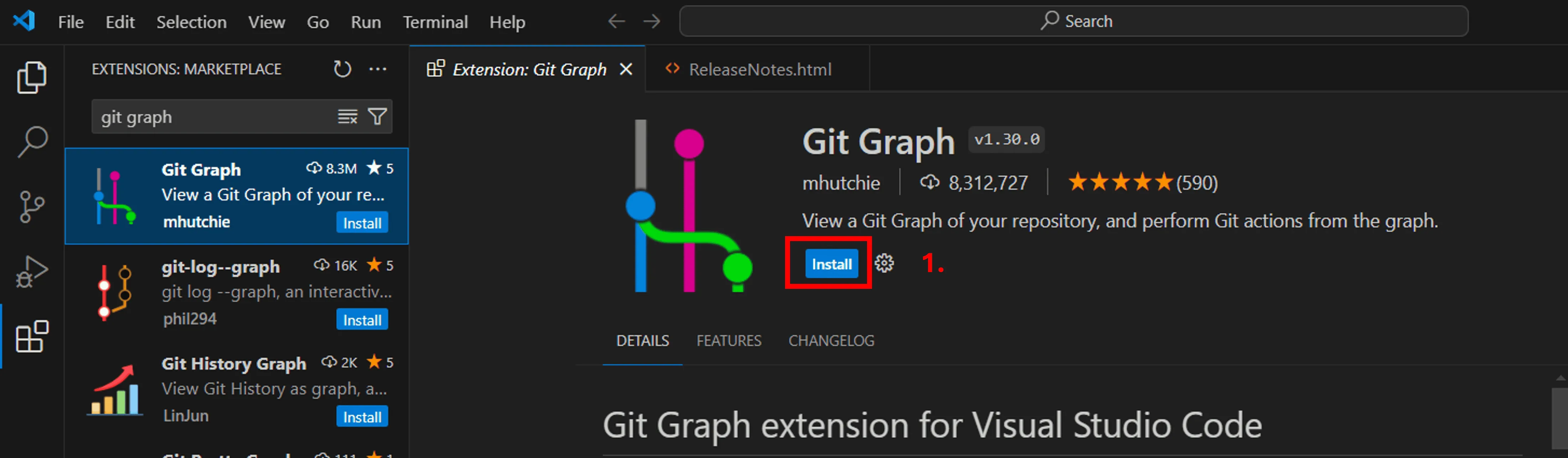
3. Add GitGraph to VS Code – this will allow you to see the historical changes of your repo as mentioned above.
- Open VS Code
- Click on Extension on the right
- Type Git graph
- Select from list
- Click Install
Step 3 – Set up GIT and Azure DevOps environments
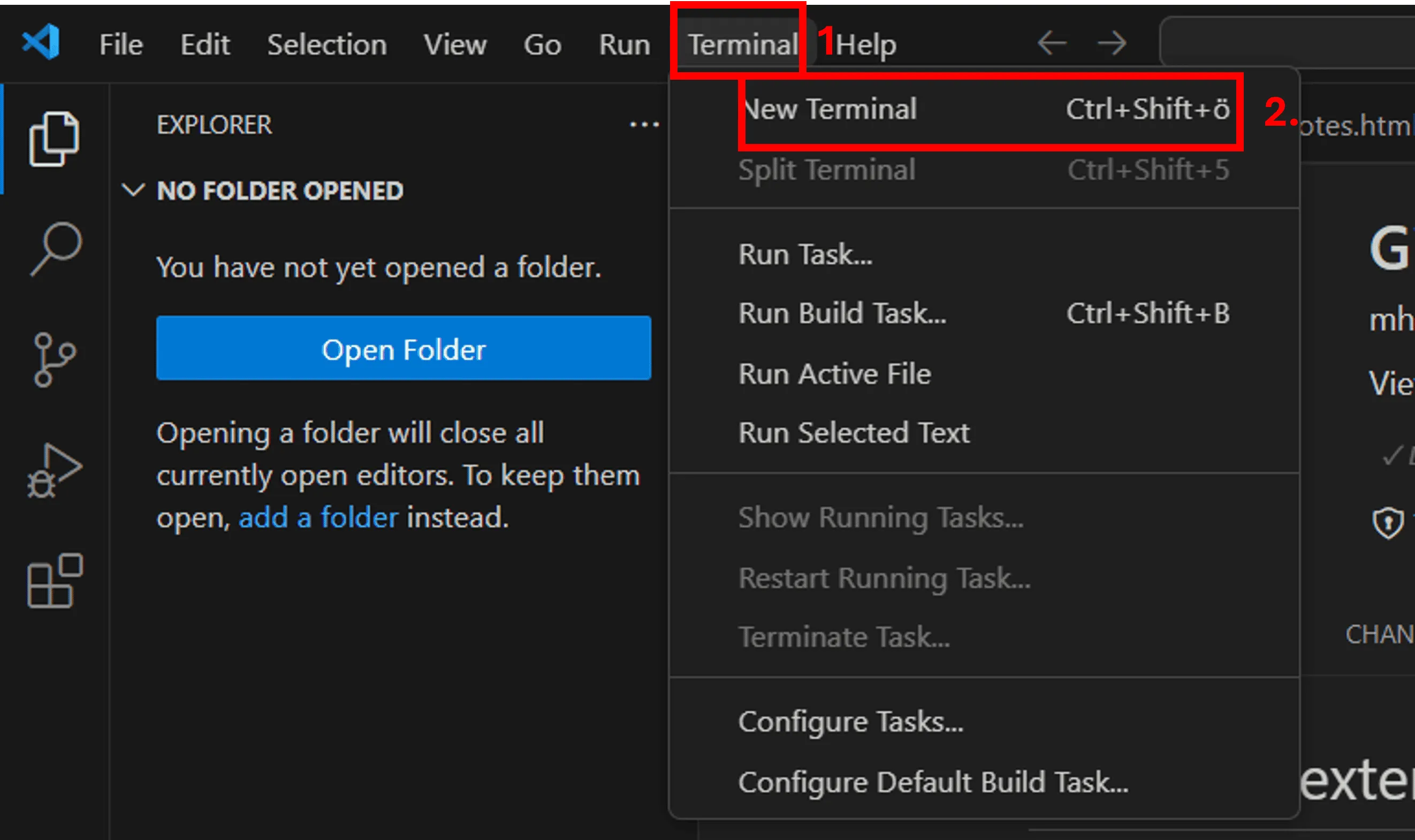
- Set up VS Code as your default GIT editor - Open a New Terminal in VS Code and type this command (you may need to restart you VS Code or machine to make the commands work properly):
git config --global core.editor "code --wait"
Set up your GIT Identity – type this command in the terminal git config --global user.name "FirstName LastName" git config --global user.email firstname.lastname@myorganization.com
Create a repo on Azure DevOps You can follow this MS documentation: https://learn.microsoft.com/en-us/azure/devops/repos/git/create-new-repo?view=azure-devops#create-a-repo-using-the-web-portal
4. Once the repo is there, you’ll see this on your screen and now you can clone it onto your computer
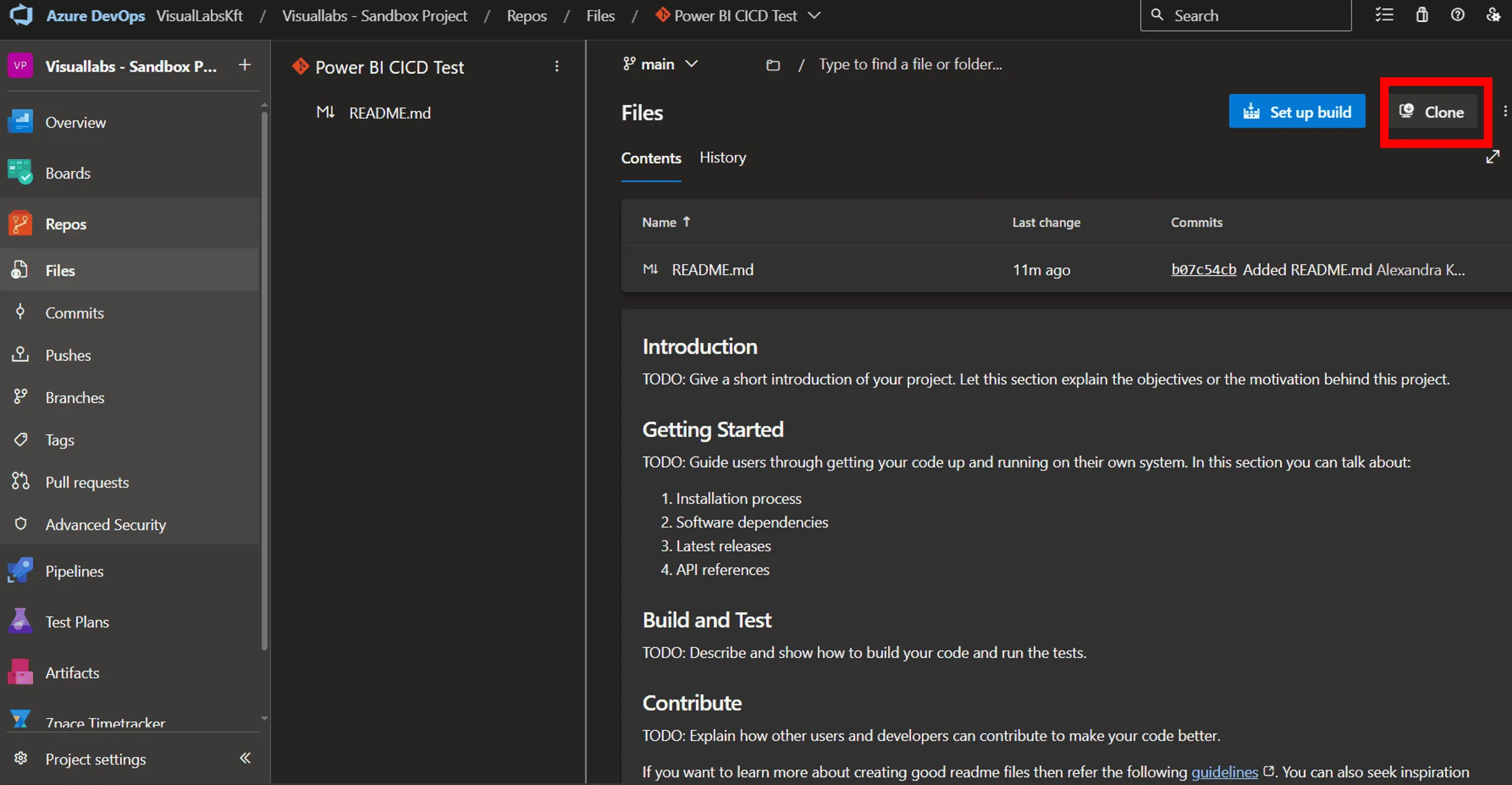
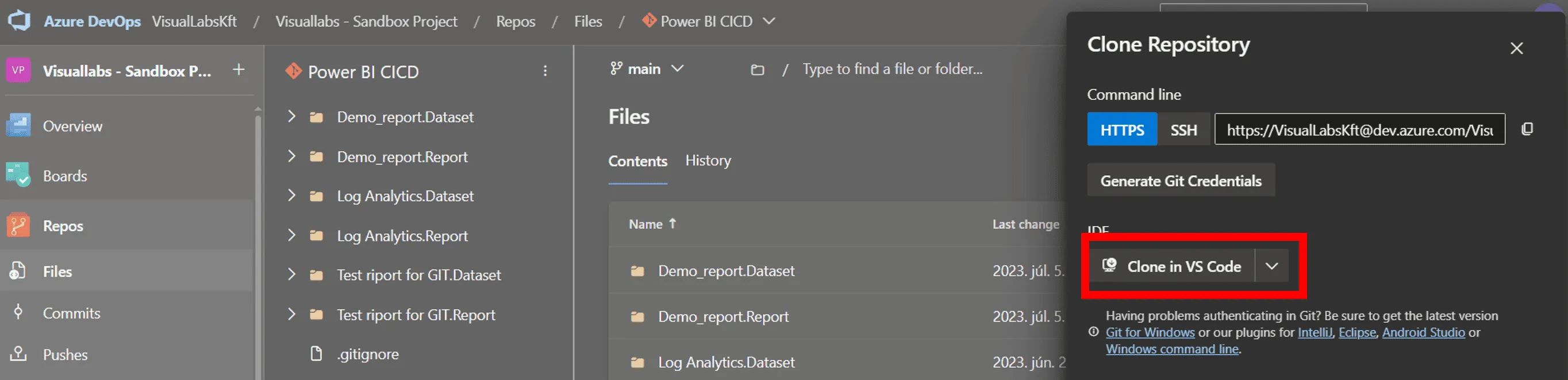
5. Select Clone in VS Code option
6. Select destination folder
My recommendation is to create a separate folder where you can store all your repos from this point. I’d also opt for a cloud location for this repo collector folder – like OneDrive.
7. In VS Code, you can check the current status of your repo
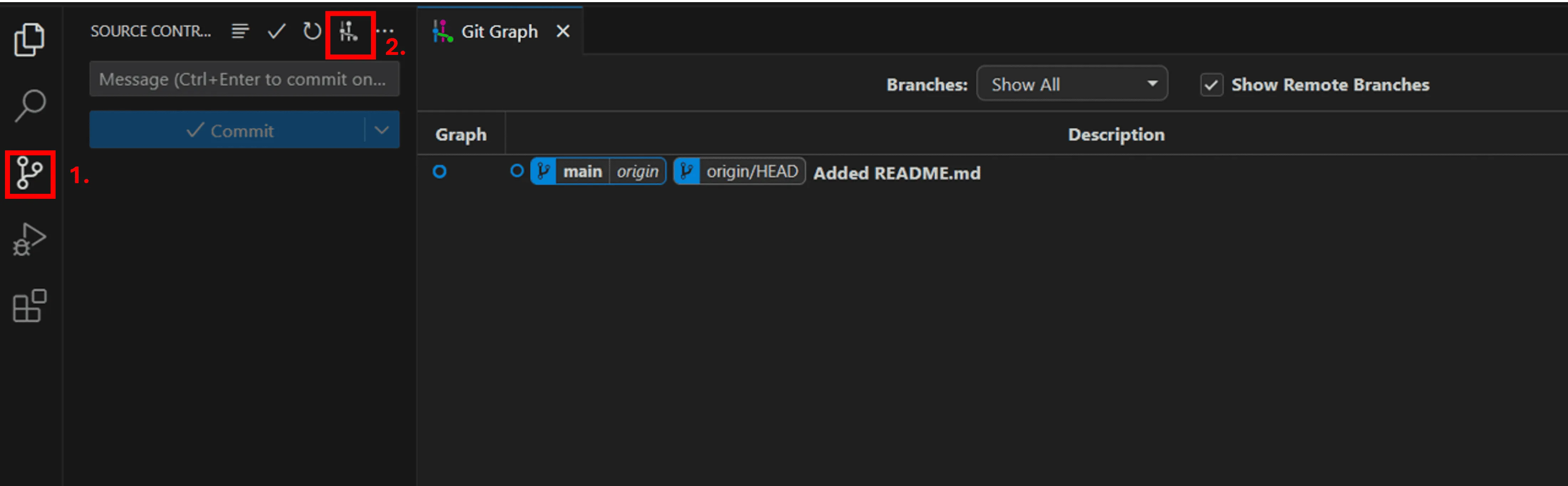
8. The last step is Save your Power BI file As.pbib to this folder.
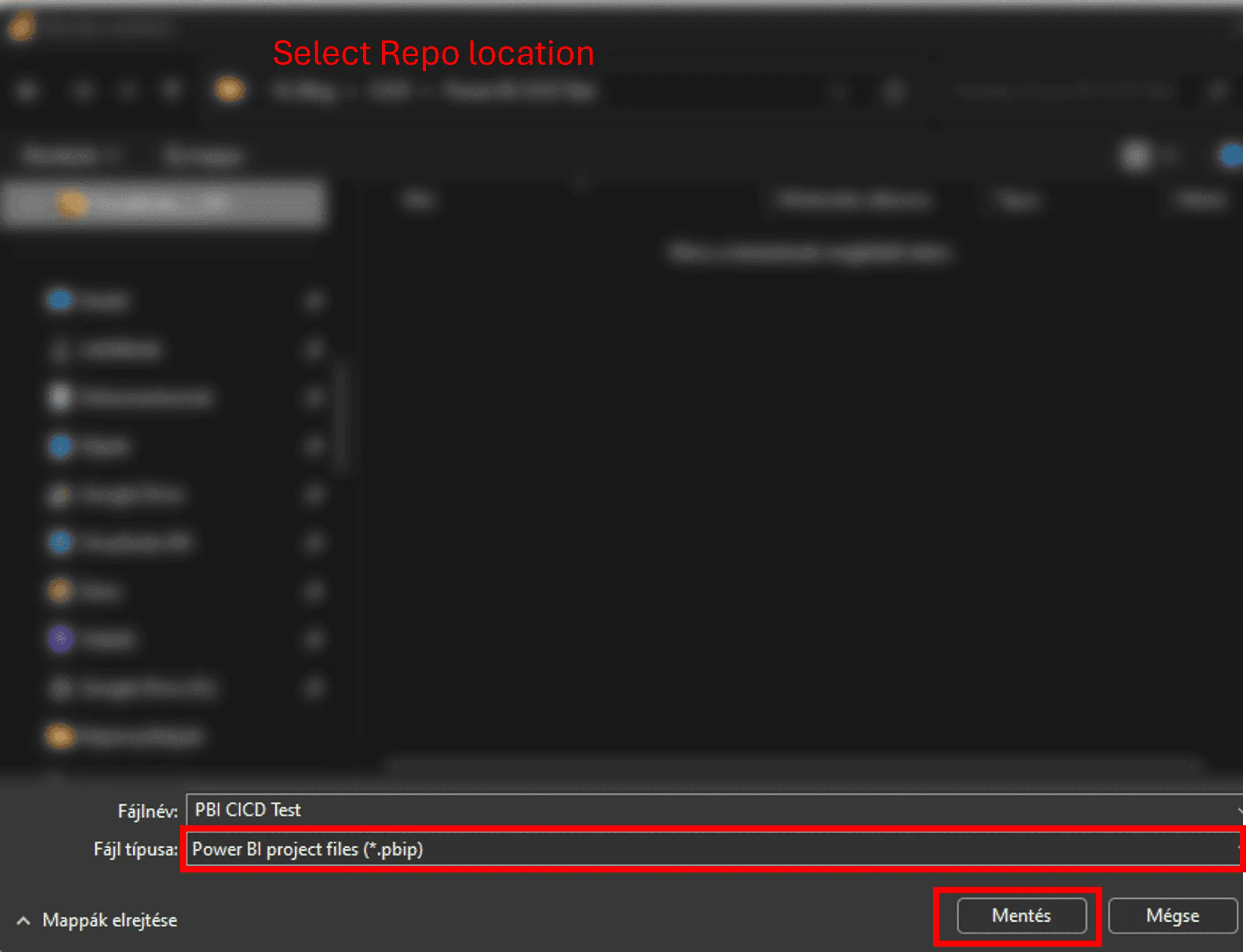
9. Click on Yes, I trust the authors to move tot he next step. You’ll see that VS Code recognized that there are new files in the folder.
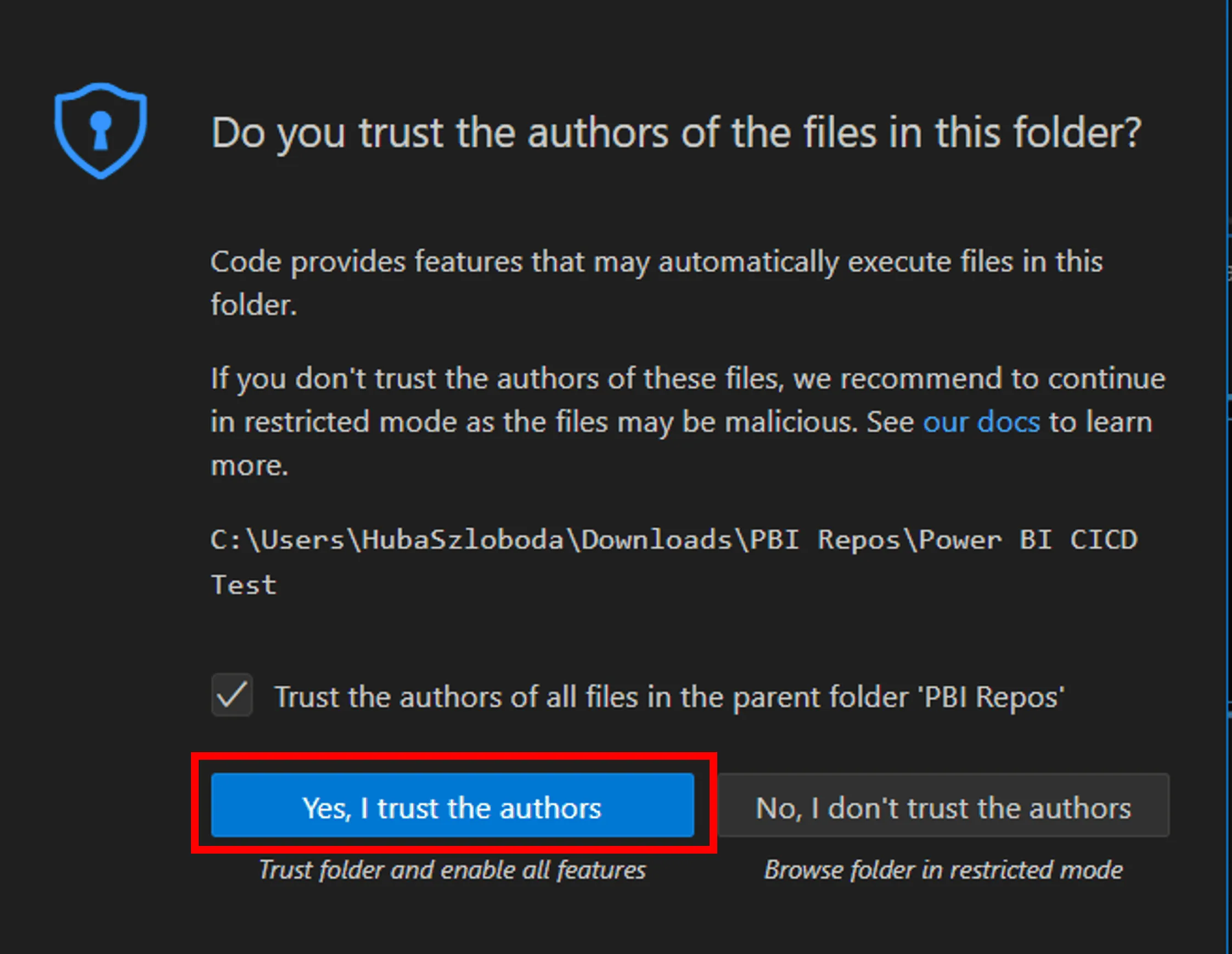
10. Now you can Add a coming message, Select the changes you want to keep (this the step called: stage changes, feel free to click on Select all) and Click Commint (it is only going to save it locally)
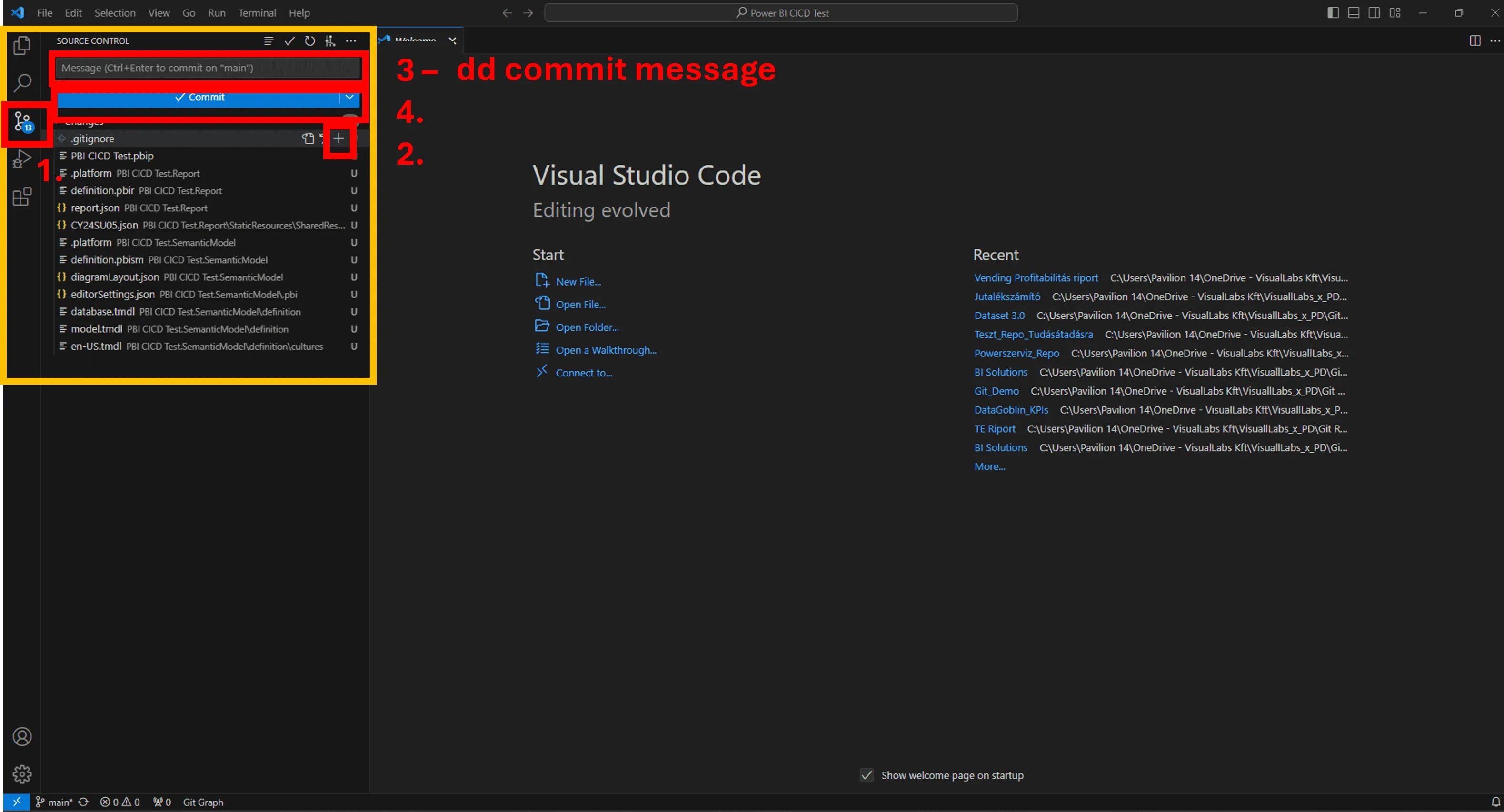
11. Click Sync changes (now it’s in the colud – you can check it in the Repo created on Azure DevOps)
12. GitGraph will look like this:

13. Congrats!
Your source control journey has officially begun! Feel free to create branches, repos etc., and start the co-development with your colleagues or just simply enjoy that you won’t ever be named to “MyProject_final_v124_final12.pbix”

Problem Statement
Monitoring of the three platforms mentioned in the title is solved independently in different locations. Logic Apps can be monitored either from the resource’s run history page or through the Logic App Management solution deployed to a Log Analytics workspace. Azure Functions have Application Insights, while the run history of Microsoft Flows is available on the Power Platform.
Most of our clients’ solutions consist of these resources, which often chain together and call each other to represent business processes and automations. Their centralized supervision is not solved, making error tracking and analysis difficult for employees. Moreover, they had to log into the client’s environment to perform these tasks.
Goal
We wanted to get a general overview of the status of the solutions we deliver to our clients, reduce our response time, and proactively prevent error reports submitted by our clients. We aimed to track our deployments in real-time, providing a more stable system and a more convenient user experience. We wanted to make our monitoring solution available within Visuallabs so that we could carry out monitoring tasks from the tenant that hosts our daily development activities.
Solution
Infrastructure Separation
Our solution is built on the infrastructure of a client used as a test subject, whose structure can be considered a prerequisite. On the Azure side, separate subscriptions were created for each project and environment, while for Dynamics, only separate environments were used. Project-based distinction for Flows is solved based on naming conventions, and since log collection is manual, the target workspace can be freely configured.
Centralized Log Collection
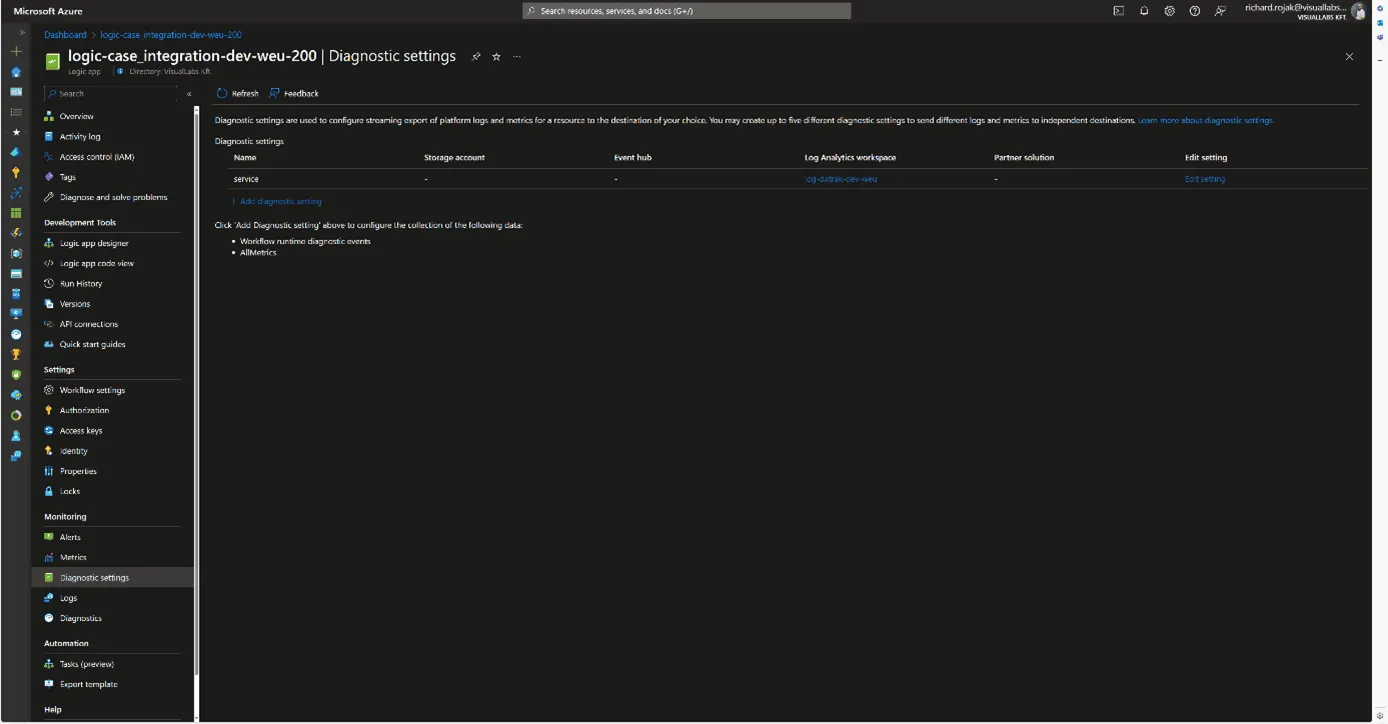
It was obvious to use Azure Monitor with Log Analytics workspaces for log collection. Diagnostic settings were configured for all Azure resources, allowing us to send logs to a Log Analytics workspace dedicated to the specific project and environment. For Microsoft Flows, we forward logs to a custom monitor table created for Flows using the built-in Azure Log Analytics Data Collector connector data-sending step. This table was created to match the built-in structure of the Logic Apps log table, facilitating the later merging of the tables.


Making Logs Accessible in Our Tenant
An important criterion for the solution was that we did not want to move the logs; they would still be stored in the client’s tenant; we only wanted to read/query them. To achieve this, we used Azure Lighthouse, which allows a role to be enforced in a delegated scope. In our case, we set up a Monitoring contributor role for the client’s Azure subscriptions for a security group created in our tenant. This way, we can list, open, and view resources and make queries on Log Analytics workspaces under the role’s scope from our tenant.
Visualization
For visualization, we used Azure Monitor Workbook, which allows data analysis and visual report creation, as well as combining logs, metrics, texts, and embedding parameters. All Log Analytics workspaces we have read access to via Lighthouse can be selected as data sources. Numerous visualizations are available for data representation; we primarily used graphs, specifically honeycomb charts, but these can easily be converted into tables or diagrams.

Combining, Customizing, and Filtering Tables
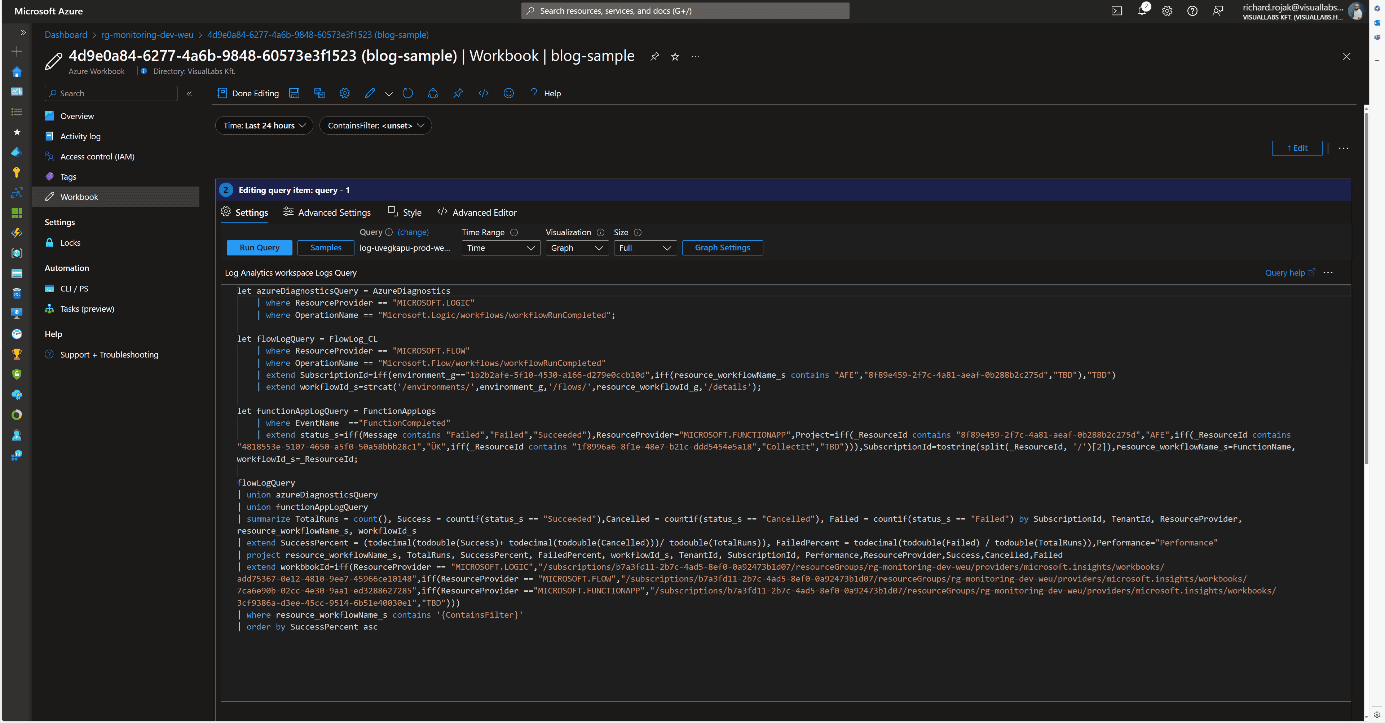
To process log tables from different resources together, we defined the columns that would be globally interpretable for all resource types and necessary for grouping and filtering.
These include:
- Client/Tenant ID
- Environment/Subscription ID
- Resource ID/Resource Name
- Total number of runs
- Number of successful runs
- Number of failed runs
Based on these, we could later determine the client, environment, project, resource, and its numerical success rate, as well as the URLs needed for references. These formed the basis for combining tables from various Log Analytics Workspaces and resources for our visualizations.
User Interface and Navigation
When designing the user interface, we focused on functionality and design. Our goal was to create a visually clear, well-interpreted, interactive solution suitable for error tracking. Workbooks allow embedding links and parameterizing queries, enabling interactivity and interoperability between different Workbooks. Utilizing this, we defined the following levels/types of pages:
- Client
- Project
- Resources
- Logic App
- Azure Function
- Flow

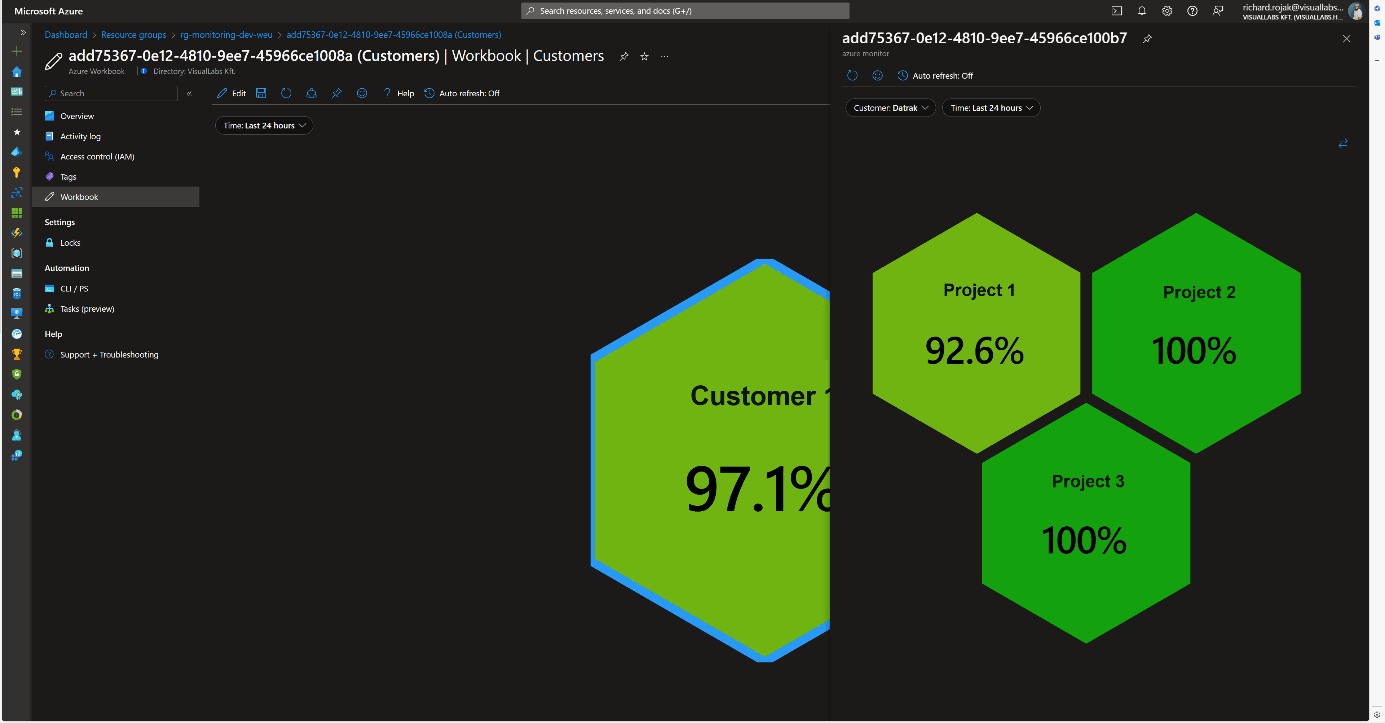
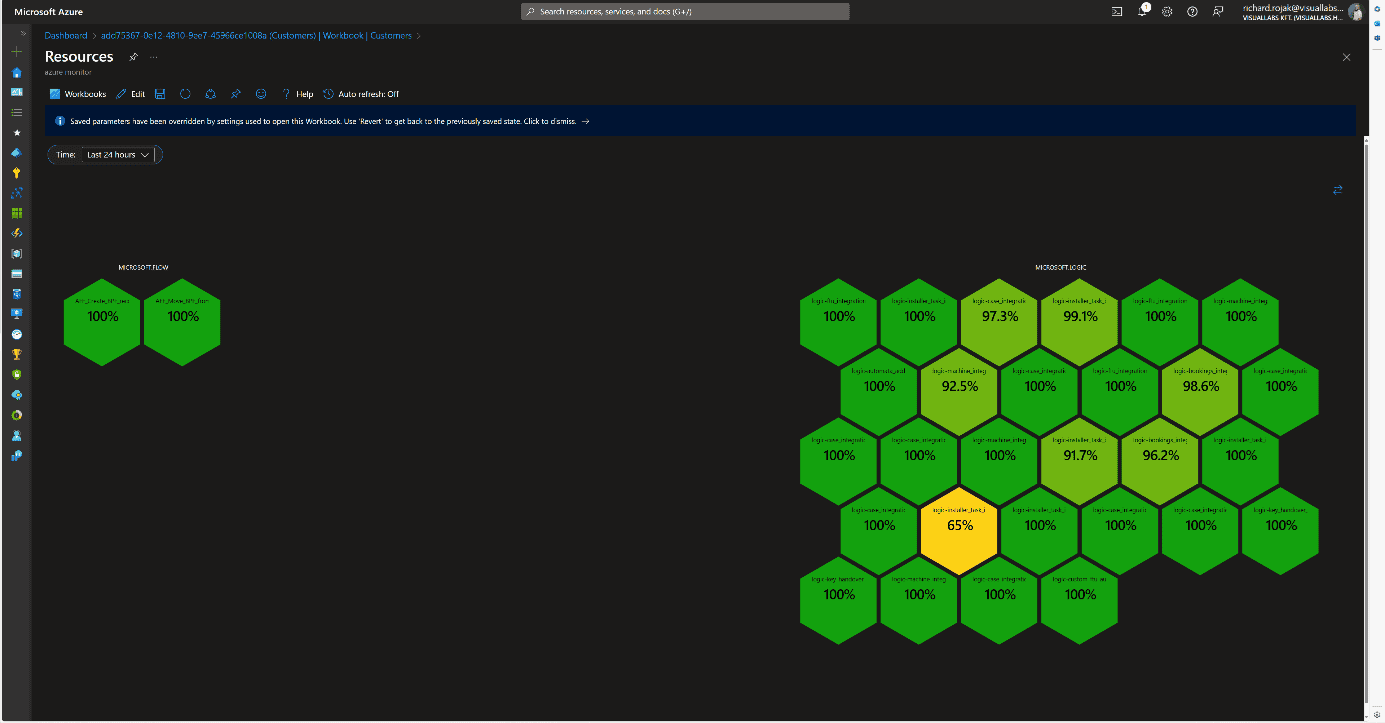
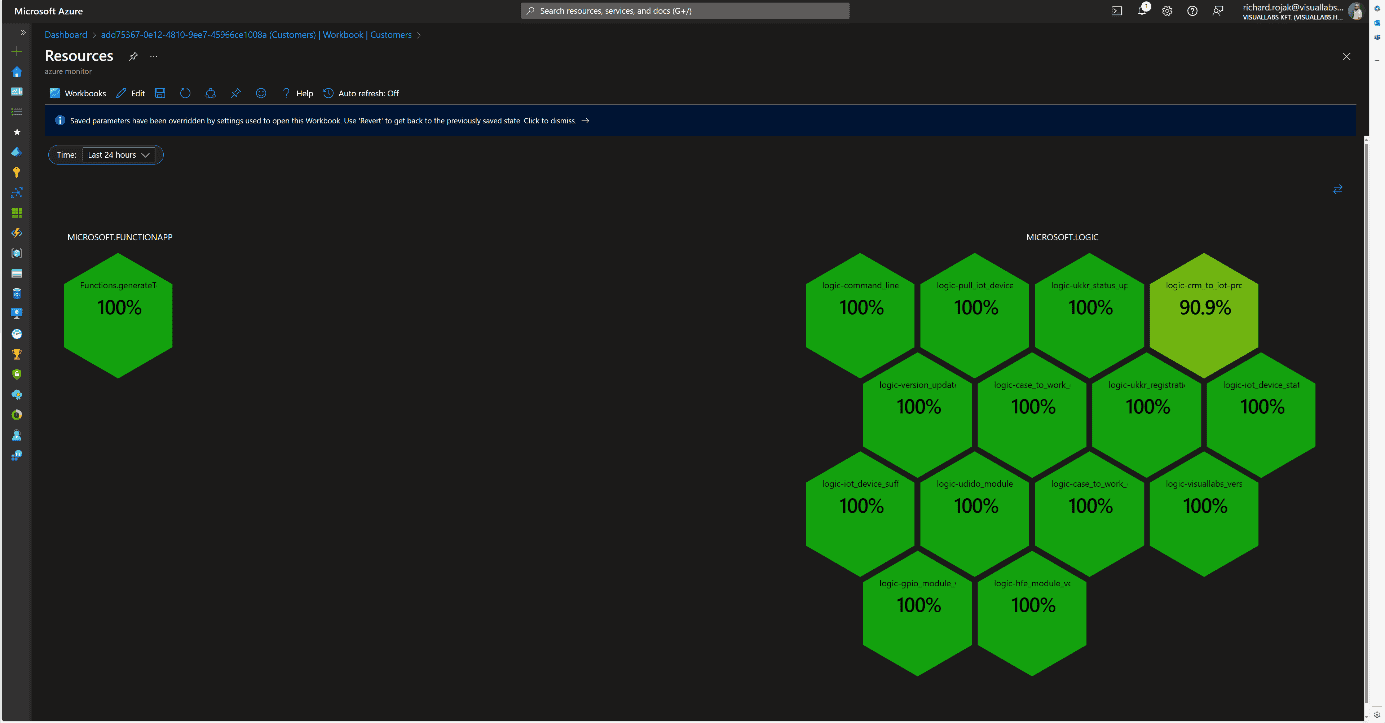

At the Client and Project levels, clicking on their names displays the next subordinate Workbook in either docked or full-window view, passing the appropriate filtering parameters. Time is passed as a global parameter during page navigation, but it can be modified and passed deeply on individual pages. We can filter runs retrospectively by a specific minute, hour, day, or even between two dates.
On the page displaying resources, we provide multiple interactions for users. Clicking on resource names navigates to the resource’s summary page on the Azure Portal within the tenant, thanks to Lighthouse, without tenant switching (except for Power Automate Flows).
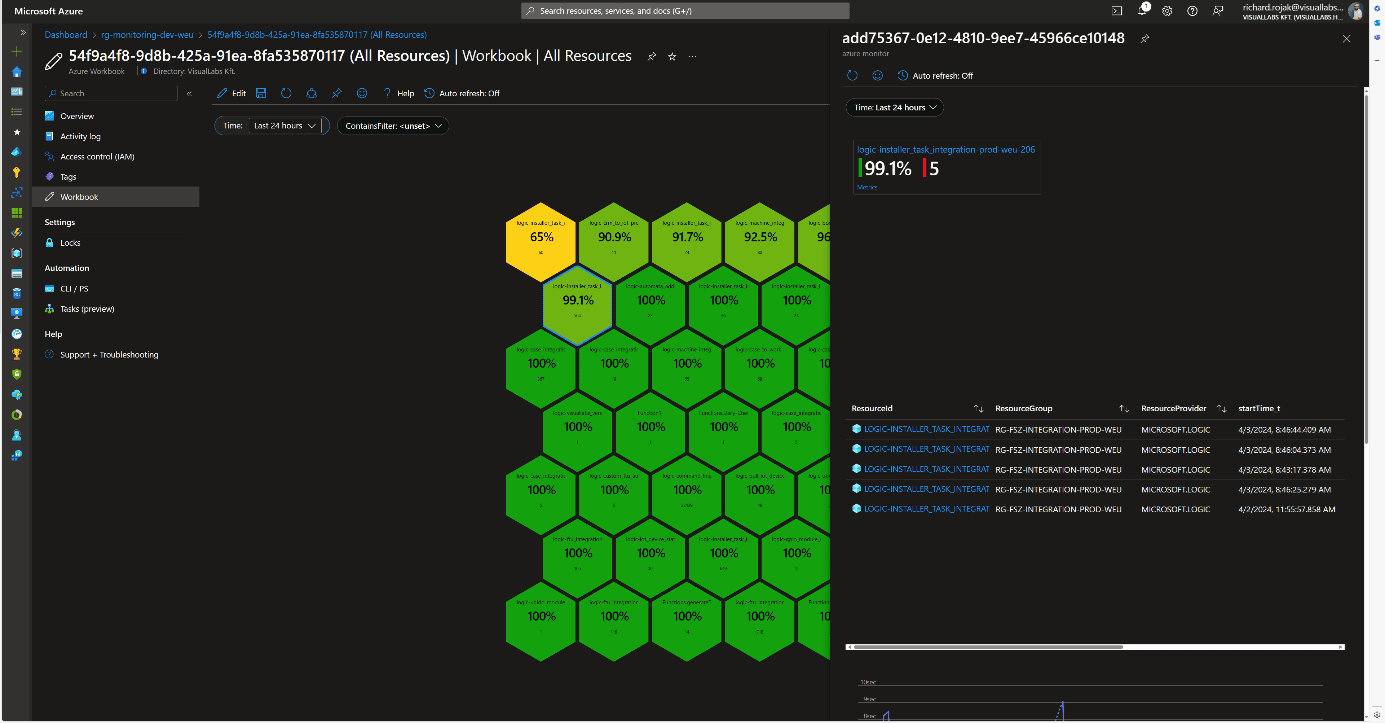
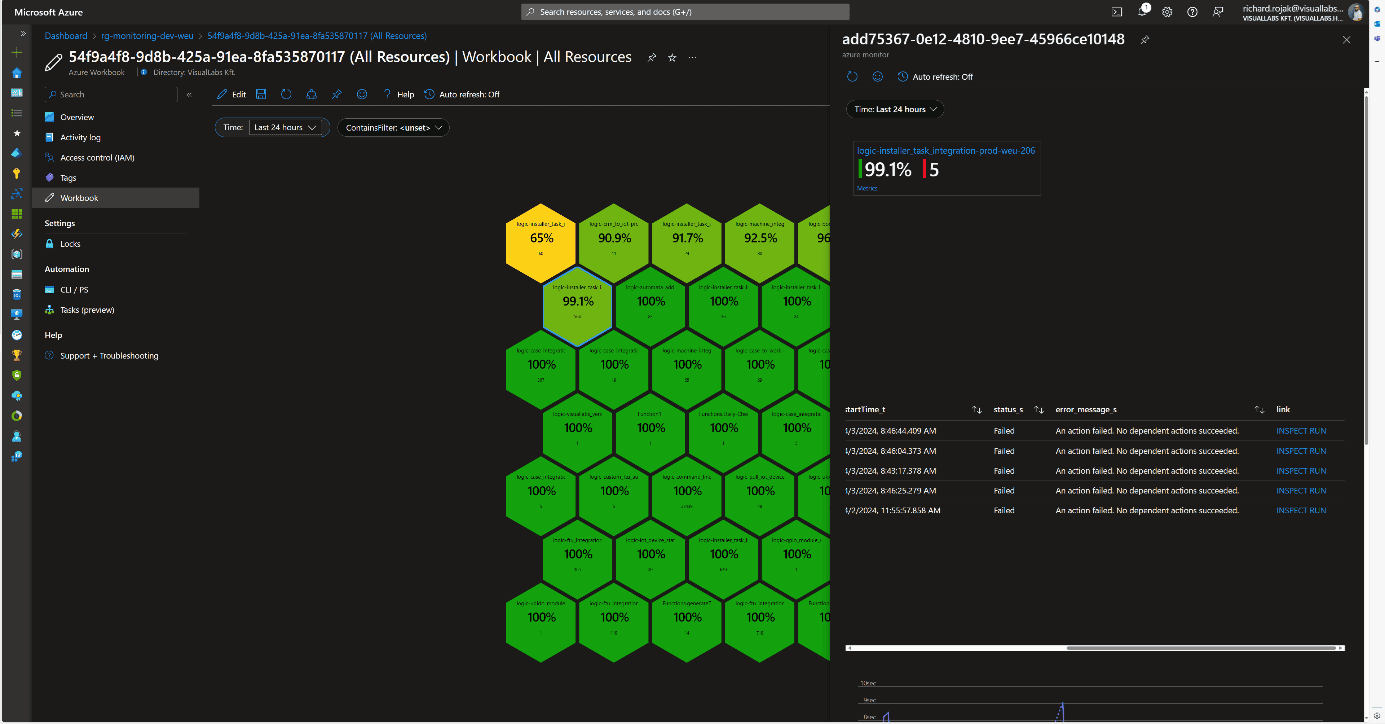
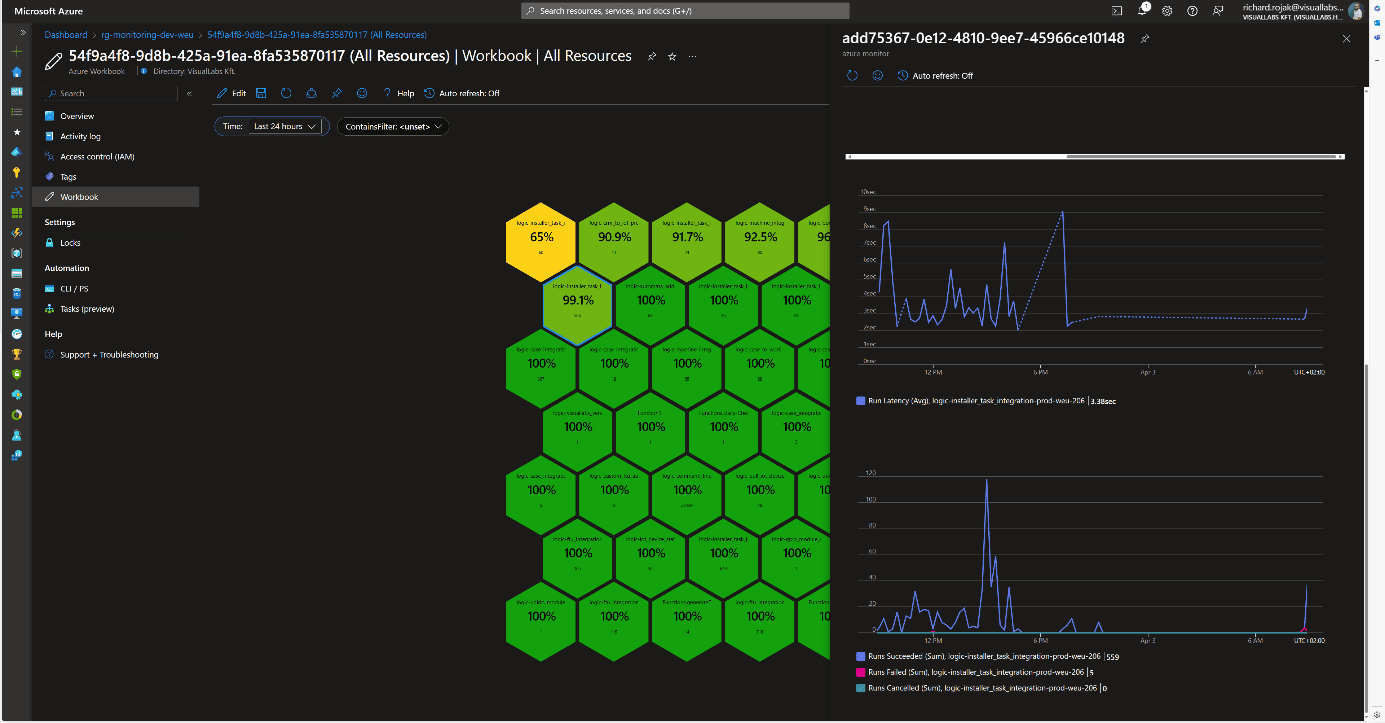
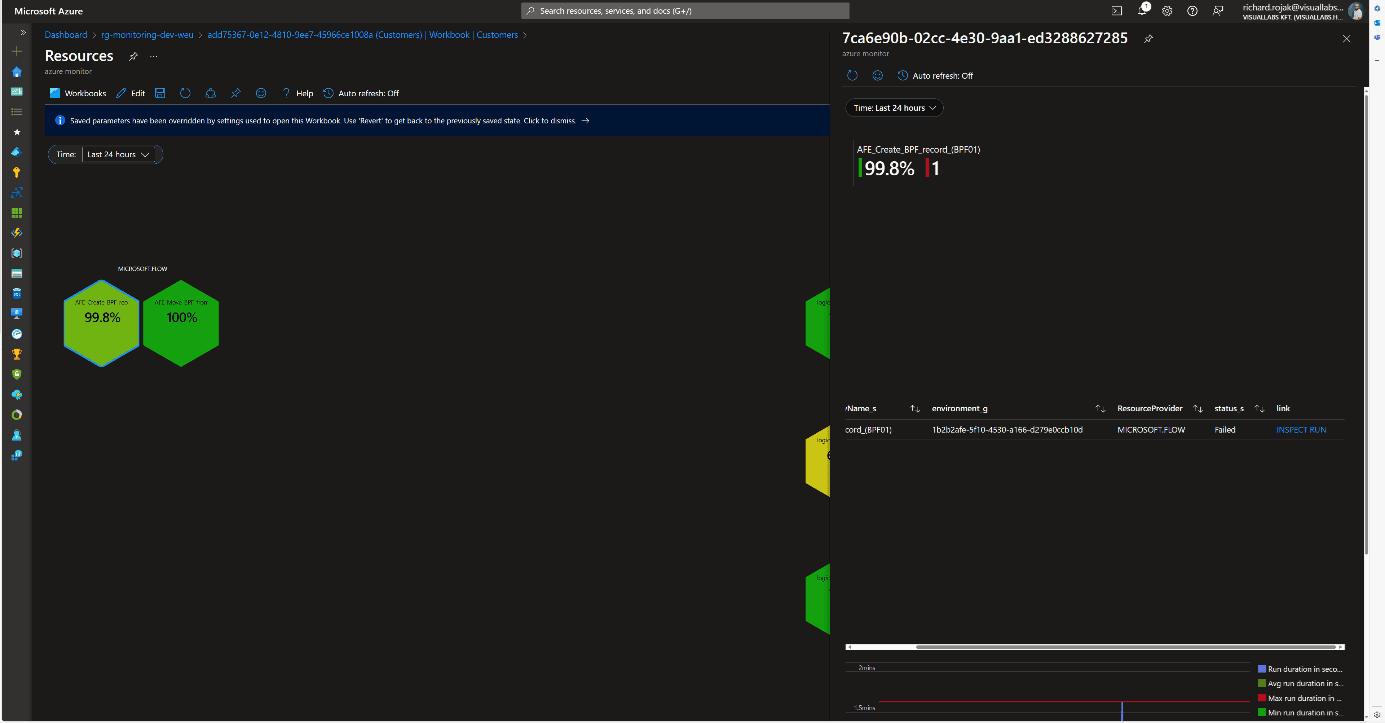
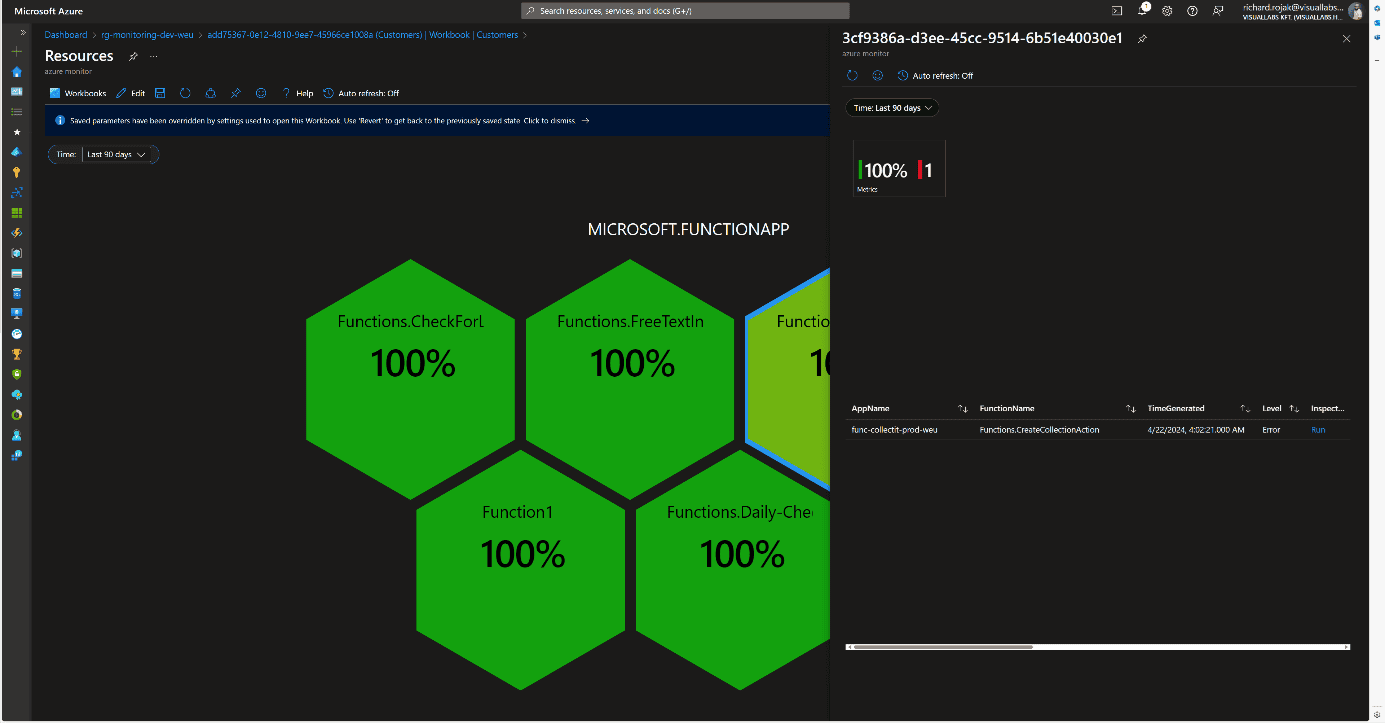
Clicking on the percentage value provides a deeper insight into the resource’s run history and errors in docked view. This detailed view is resource type-specific, meaning each of the three resources we segregated has its own Workbook. We always display what percentage of all runs were successful and how many faulty runs occurred, with details of these runs.
Logic App
Beyond general information, faulty runs (status, error cause, run time) are displayed in tabular form if any occurred during the specified time interval. Clicking the INSPECT RUN link redirects the user to the specific run where all successful and failed steps in the process can be viewed. At the bottom, the average run time and the distribution of runs are displayed in diagram form.
Microsoft Flow
For Flows, the same information as for Logic Apps is displayed. The link also redirects to the specific run, but since it involves leaving Azure, logging in again is required because Dynamics falls outside the scope of Lighthouse.
Azure Function
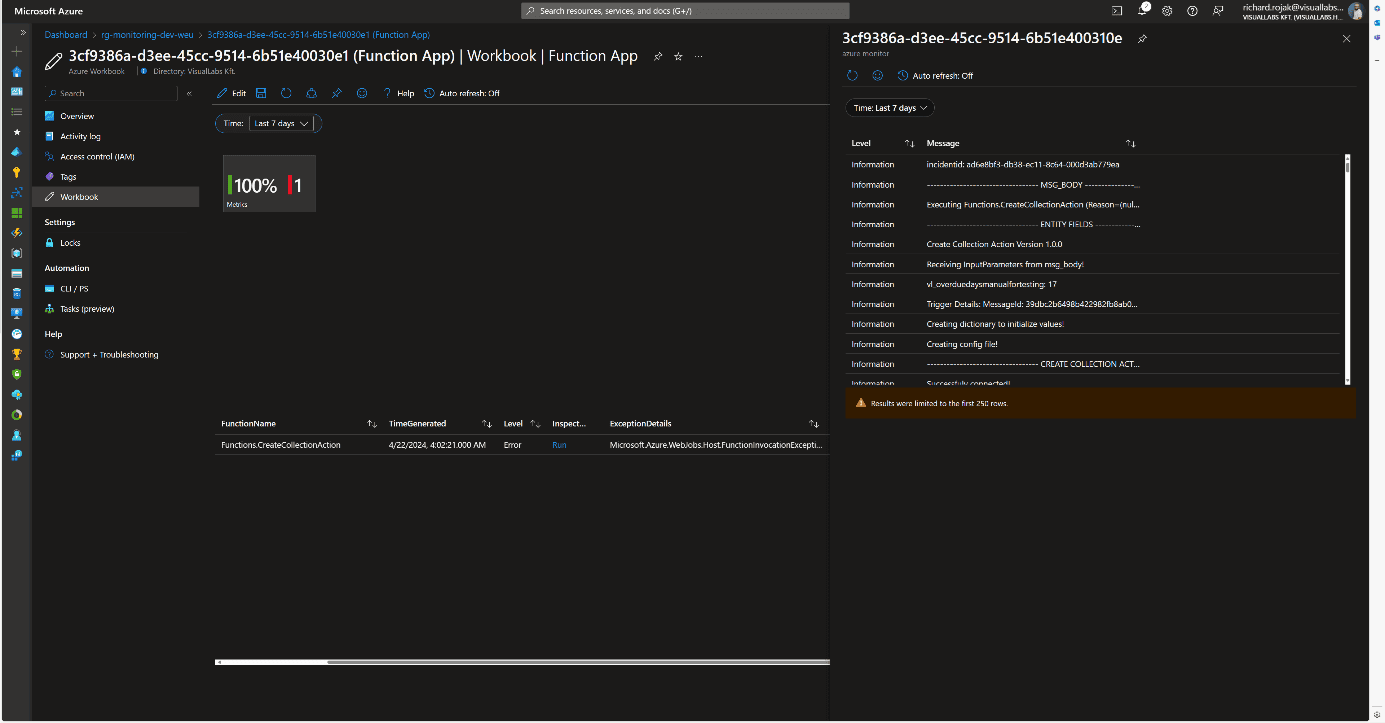
The structure is the same for Azure Functions, with the addition that the link redirects to another Workbook instead of the specific run’s Function App monitor page. This is necessary because only the last 20 runs can be reviewed on the Portal. For older runs, we need to use Log Analytics, so to facilitate error tracking, the unique logs determined by developers in the code for the faulty run are displayed in chronological order.
Consolidated View
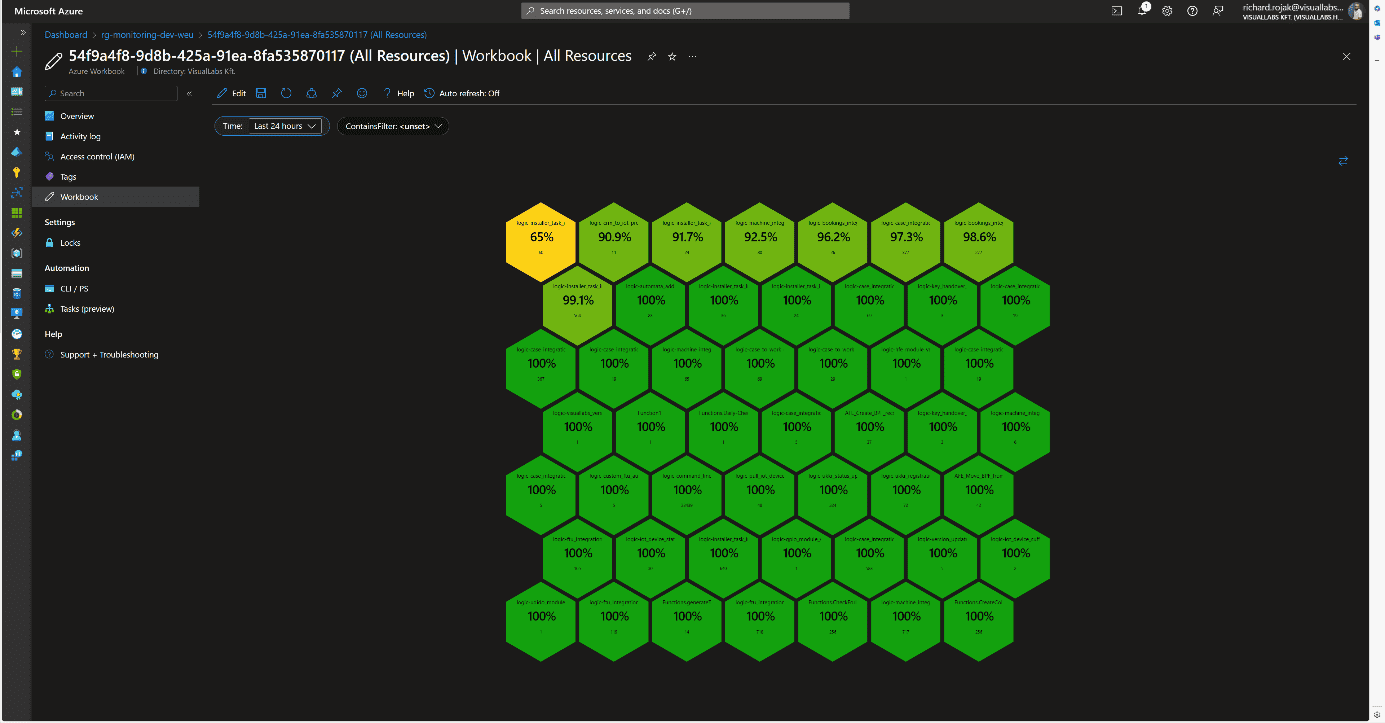
Since organizationally, the same team may be responsible for multiple projects, a comprehensive view was also created where all resources are displayed without type-dependent grouping. This differs from the Workbook of a specific project’s resources in that the honeycombs are ordered by success rate, and the total number of runs is displayed. Clicking on the percentage value brings up the previously described resource type-specific views.
Usability
This solution can be handy in cases where we want to get a picture of the status of various platform services in a centralized location. This can be realized interactively for all runs, except for Flows, without switching tenants or possibly different user accounts. Notification rules can also be configured based on queries used in Workbooks.
Advantages:
- The monitoring system and visualization are flexible and customizable.
- New resources of the same type can be added with a few clicks to already defined resource types (see: configuring diagnostic settings for Logic Apps).
Disadvantages:
- Custom log tables, visualizations, and navigation between Workbooks require manual configuration.
- Integrating Flows requires significantly more time investment during development and planning.
- Combining tables, separating environments and projects can be cumbersome due to different infrastructure schemas.
- Basic knowledge of KQL (Kusto Query Language) or SQL is necessary for queries.
Experience
The team that implemented the solution for the client provided positive feedback. They use it regularly, significantly easing the daily work of developer colleagues and error tracking. Errors have often been detected and fixed before the client noticed them. It also serves well after the deployment of new developments and modifications. For Logic Apps, diagnostic settings are included in ARM (Azure Resource Manager) templates during development, so runs can be tracked from the moment of deployment in all environments using release pipelines.
