

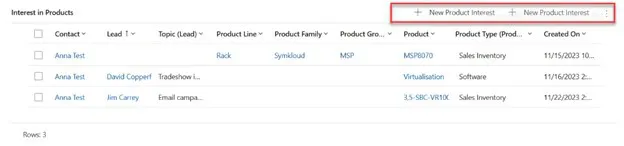
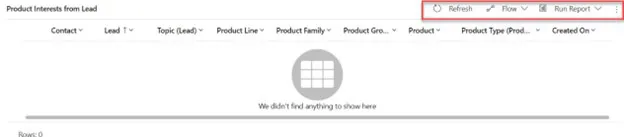
Depending on the stage of a sales process, different functions should be available on a form's Subgrid. Practically, this means that at the beginning of the process, interests can be added to a Lead, but these should not be modifiable later in the Opportunity phase.This article requires some technical knowledge for understanding and application, so it is recommended for Dynamics 365 CE app makers who are already familiar with the Power Platform world.
Starting point:
Goal:
Tools Used for the Solution:
- JavaScript (Recommended: XRM toolbox – Web Resource Manager) - WebResources Manager · XrmToolBox
- Ribbon Workbench - Develop 1 Ltd | Ribbon Workbench for Dynamics 365 & Dynamics CRM
The Solution:
1. Solution
Create a Solution that will be loaded into the Ribbon Workbench. Add the entity whose SubGrid you want to modify into this solution. (Important: when adding the existing entity to the Solution, do not import any other elements). The name of the Solution should always be constructed based on the following logic: Ribbon_VL_[entity name] e.g., Ribbon_VL_Product_Interest.

2. Subgrid
Name the SubGrid with a unique, identifiable name. Do not use the automatically generated name, as you will refer to this later.
3. JavaScript
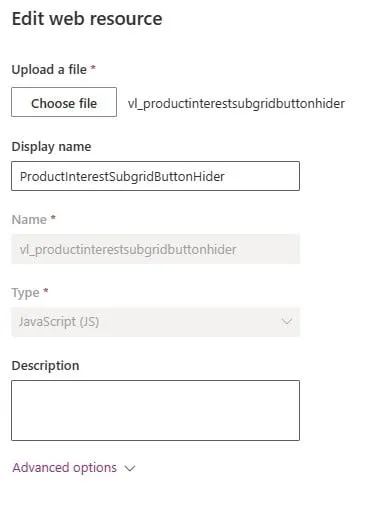
Create the following JavaScript as a .js file (using VS Code), then upload it to the solution containing the Web resources. It is advisable to name the file the same as its content to make it easier to find later.
forProductInterestView: function (selectedControl) {console.log("start.forProductInterestView");"use strict";debugger;var currentGridName = selectedControl._controlName;console.log("forProductInterestView-currentGridName: "+currentGridName);var excludedPayRun = "subgrid_prodinterest"; //Name of the subgridif (currentGridName == excludedPayRun) {console.log("end.forProductInterestView.true");return false;}else { console.log("end.forProductInterestView.false");return true; }}
4. Ribbon Workbench
Open the Ribbon workbench and add the solution created in step one. Each entity has 3 ribbons: Home, Subgrid, Form. We now need the Subgrid.
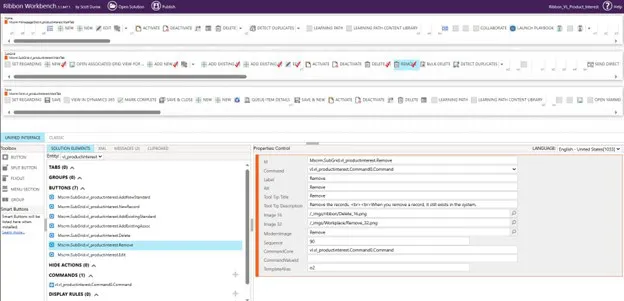
Select the button you want to remove by right-clicking on it and pressing "Customise Button." A red checkmark will appear, and it will also be added to the Buttons section below. If it is already checked, it means a command is already associated with it; in that case, you need to add a new command and can skip this step.
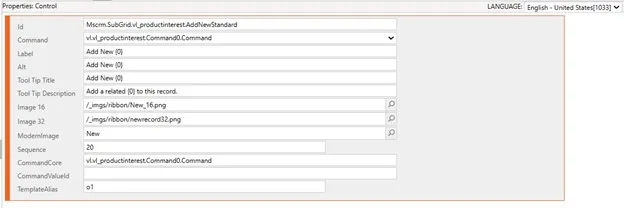
Next, add a Command, which can be done by clicking the plus sign in the Commands section. The command should look like this:
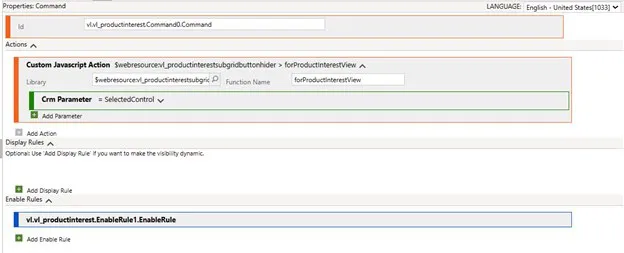
Explanation:
- Library: The webResource you added to the solution (this is where the good naming comes in)
- Function name: The name given in the JavaScript. (The part before the Function)
- CRM Parameter: What parameter to pass; in this case, it is the SelectedControl. This Control manages the SubGrids on Forms and all listings. The PrimaryControl manages the form.
Next, add an EnableRule that hides the buttons.
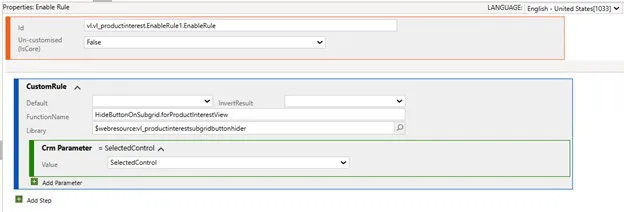
Explanation:
- Library: The webResource you added to the solution (this is where the good naming comes in)
- Function name: The name given in the JavaScript. (The part before the Function)
- CRM Parameter: What parameter to pass; in this case, it is the SelectedControl
Only one step remains before Publishing. For the buttons, specify which Command should be associated with them.
I hope you find this article useful and that it provides a solution idea.

When I started working at VisualLabs, during the first WSM (weekly standup meeting) where each business division reports on their current weekly tasks, I noticed how many abbreviations we use. As a member of the ERP team, I wondered if we know exactly how these abbreviations came about and what they stand for.
The term ERP (Enterprise Resource Planning) is familiar to everyone today, but few know its exact origins and development path. Therefore, I decided to gather information on where it started and the major milestones that helped shape the ERP systems we know today. Looking back in time, we will realize how deeply this technology is rooted in the modern business world.
In this blog, I have compiled seven milestones that contributed to the development of the ERP system as we know it today.
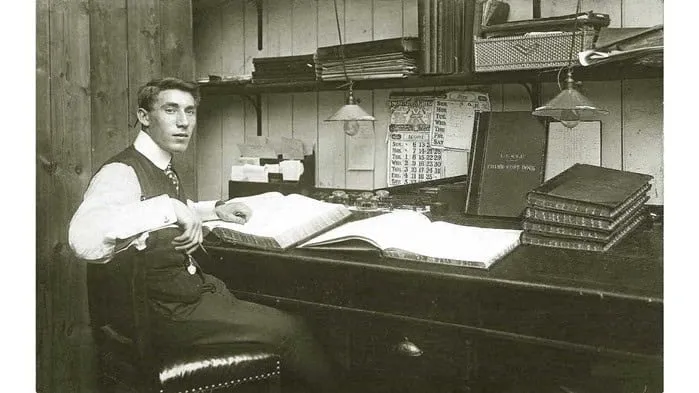
In today’s world, it would be unimaginable for a company not to use some kind of computer system for its various processes. However, before the advent of computers, companies had to manage these processes (be it accounting or production planning) using some methods. Take accounting, for example. Accountants recorded every financial transaction manually on paper in different books, which they managed daily and monthly. It is hard to imagine that companies often had rooms full of (main) books and files, each containing dozens of transactions. At the center of it all was the accountants’ most precious asset, the general ledger. It is daunting to think about how much work the year-end closing process entailed and how many errors could occur during this process.
- Birth of Computers (1950s):
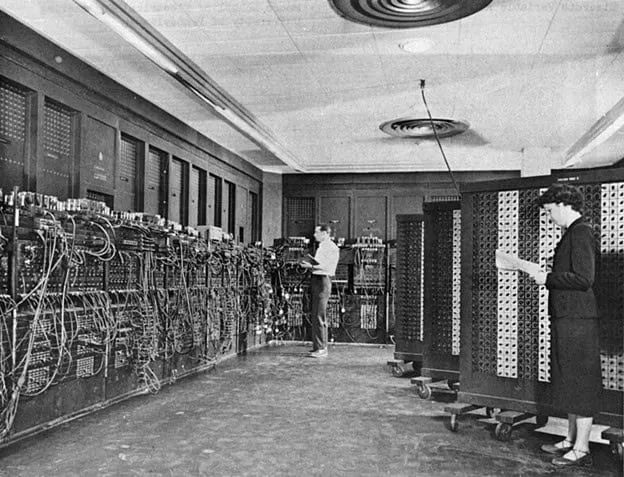
In the 1950s, with the birth of computers – theoretically founded by John von Neumann – a new dimension opened up in the operation of companies and the transformation of their processes. Although these computers were primarily used in the military and scientific fields in the 50s – due to their large size and cost – continuous technological developments soon brought them into the business world. These devices allowed faster data processing and analysis and helped automate business activities.
2. Inventory Management and Control (1960s):
One of the first milestones in recognizing the potential of computers for business opportunities stretches back to the 1960s. The manufacturing industry realized the need for a system that would enable inventory management, monitoring, and control. The emergence of information technology allowed companies to integrate and automate their business processes. As a result, they improved the efficiency and accuracy of inventory management. This was one of the first steps toward developing ERP systems.
3. Material Requirements Planning (MRP I, 1970s)
The concept of MRP (Material Requirements Planning) first appeared in 1970 and fundamentally represented a software-based approach to planning and controlling manufacturing processes. MRP’s application primarily focused on planning and tracking material requirements. This approach allowed companies to predict more accurately the type and amount of materials needed during production processes. With MRP, companies could manage material procurement and production scheduling more effectively, reducing losses from over- or underestimation. This innovation had a significant impact on the manufacturing industry and fundamentally transformed companies’ material planning processes. This approach contributed to increased efficiency and competitiveness of manufacturing companies in the 1970s.
4. Manufacturing Resource Planning (MRP II, 1980s): The 1980s marked a significant milestone with the advent of MRP II systems. While MRP focused solely on the inventories and materials needed based on real or forecasted customer demands, MRP II provided greater insight into all other manufacturing resources. By extending manufacturing planning beyond materials to include labor, machinery, and other production resources, it gave companies much greater control over their manufacturing processes.
5. Enterprise Resource Planning Systems (ERP, 1990s): In the 1990s, the first true ERP systems were introduced. (The term ERP itself was coined by the research firm Gartner in the 1990s.) ERP systems represented a significant advancement compared to MRP II systems as they focused not only on manufacturing but also on the full integration and automation of business processes. Such processes included procurement, sales, finance, human resources, and accounting. With full integration, companies could manage their business processes in a unified database, offering numerous advantages. The unified storage and management of information ensured access to accurate, up-to-date data, improving decision-making and efficiency. The connected business areas helped formulate and implement unified strategies. As a result, the ERP system became a “one-stop solution” that managed all company information.
6. Web-Based Functionalities with the Rise of the Internet (ERP II, 2000s): In the mid-2000s, as the internet’s role grew in the business world, ERP systems also adapted to this change. Systems began incorporating customer relationship management (CRM) and supply chain management (SCM) functionalities. ERP II emphasized user-friendly interfaces and customization. Modular systems were developed, allowing businesses to select and implement the components most relevant to their operations.
7. Cloud-Based ERP (2010s): In the 2010s, the emergence of cloud technology added a new dimension to ERP systems. Cloud-based ERP solutions allowed companies to store and run their ERP systems in the cloud instead of traditional “on-premise” installations. This offered significant advantages, including greater flexibility, lower costs, and easier access to critical data. With cloud-based ERP systems, companies no longer had to worry about server maintenance or software updates, as these tasks were handled by their providers. This allowed companies to focus on their business goals and processes while ensuring their system was always up-to-date and accessible.
+1 The Future of ERP: So where is the development of ERP systems headed today? With intelligent algorithms and artificial intelligence, systems are increasingly able to automate and optimize business processes, reducing the need for human intervention. Data will continue to play a key role in the future, as more efficient analysis of data enables companies to make better business decisions. The integration of ERP systems with various IoT devices allows real-time data exchange, providing companies with quicker and more accurate answers to support different business questions.

ERP systems are also increasingly providing personalized user experiences and offering expandable integrations with other business applications and technologies. In the future, ERP systems will not just function as tools but will provide true business intelligence and competitiveness, helping companies keep pace with the rapidly changing business environment and stand out from their competitors.
Are you exploring the world of ERP systems? Visual Labs can help you uncover the possibilities within.
Sources:
https://www.geniuserp.com/resources/blog/a-brief-history-of-erps https://www.fortunetechnologyllc.com/history-of-erp-systems/ https://www.geniuserp.com/resources/blog/a-brief-history-of-erps
https://www.erp-information.com/history-of-erp.html#google_vignette https://www.techtarget.com/searcherp/tip/MRP-vs-MRP-II-Learn-the-differences https://www.business-case-analysis.com/account.html https://www.britannica.com/technology/computer/IBM-develops-FORTRAN https://business.joellemena.com/business/when-did-computers-start-being-used-in-business-2/

Power Pages
Digital presence is becoming increasingly important for every business. To stay competitive, we need to quickly adapt to changing demands and technological advancements. Therefore, it is essential to use tools that allow us to efficiently and quickly create websites that meet our business goals.
Power Pages, previously known as Microsoft Power Apps Portals, is a platform that allows us to build websites quickly and easily while seamlessly integrating them with our existing data sources. Power Pages is an ideal solution for businesses that want to create websites swiftly without lengthy development times.
For example, we used Power Pages for the Construction Monitoring and Data Service System’s portals, which greatly assists clients in recording, tracking, and administering their inquiries.
Power Pages also played a crucial role in an IT audit project, enabling us to efficiently handle data provision from multiple companies.
Collecting and managing data services is one of the most critical phases of audit projects, especially when involving multiple companies. Power Pages proved to be an extremely useful tool in this process, where we had to request data from numerous companies and then collect and manage this information through the platform. The platform allowed the creation of websites in a simple and intuitive manner without requiring complex coding knowledge.
Firstly, with Power Pages, we easily created a user-friendly interface that enabled companies to submit their data services efficiently. The interface featured simple data entry forms, making it easy for companies to understand how to input information into our system.
Secondly, Power Pages allowed for easy management and tracking of data throughout the project. The transparent administration interface helped us keep track of which companies had submitted their data and the status of the data collection process. This allowed us to respond efficiently to any shortcomings or questions from the companies.
Thirdly, Power Pages facilitated the easy integration and analysis of data within the audit project. The collected data could be easily imported into other systems (e.g., Power BI), making it readily usable in the audit process. This enabled us to analyze and evaluate the information submitted by companies more quickly and efficiently.
Overall, Power Pages offers a scalable solution, flexible and customizable, adapting to unique business needs and requirements. This allows businesses to freely shape and expand their websites according to their business goals.
One of our clients had a need for such a website.
The Sales Portal we created for one of our clients is a website that enables external sales partners or distributors to collaborate on sales opportunities and increase sales within the organization. This site provides state-of-the-art, secure authentication and fully customizable design and functionality. Distributors can log in and collaborate on sales opportunities in full sync with internal sales teams, thanks to instant two-way data synchronization. The marketing department can assist in the sales process by updating sales guides and materials available on the homepage, keeping the latest product information up-to-date.
If you also want to create websites quickly and efficiently for your business, it might be worth trying out Power Pages. The Visual Labs team is happy to assist you with this!
Deming's System of Profound Knowledge - IT Revolution
What is the book about?
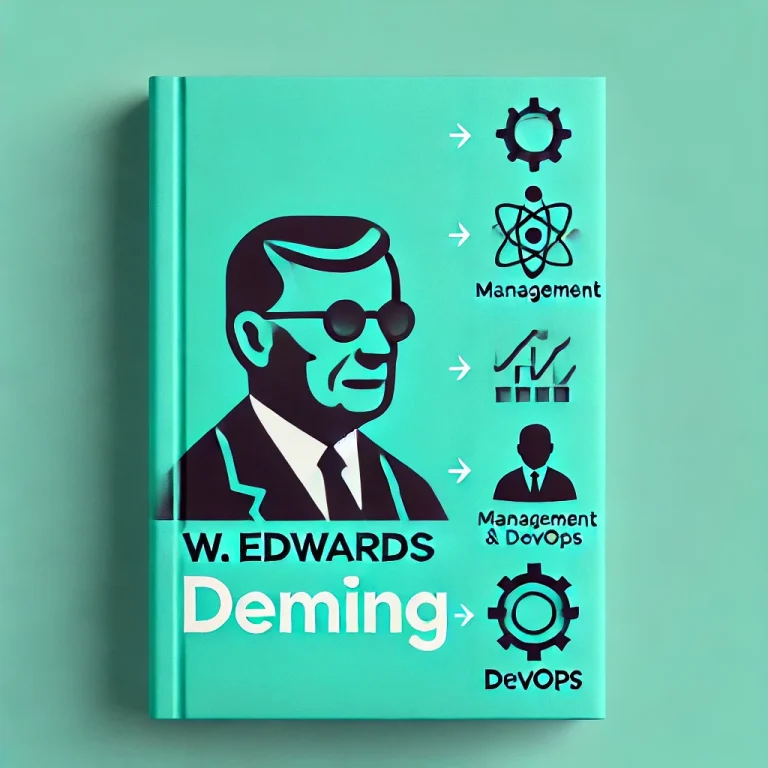
This book covers the life of W. Edwards Deming who founded modern managerial statistics and contributed greatly to WWII production effort in the US and post-war recovery on Japanese manufacturing.
This book is not merely a biography; it intertwines Deming's life story with the evolution of management history, providing a comprehensive view of his impact.
As the book was published by IT revolution and written by the co-author of the DevOps Handbook, it talks in detail about how agile methodologies.
What I found useful?
It was truly insightful to see the lineage of how different managerial waves evolved in the past hundred years, how the different management methods succeeded each other (from Total Quality Management through Lean and then how the foundations permeated into Agile and later to DevOps). The author paints a great picture of the events and the people involved besides Deming.
The first half of the book talks about the evolution of modern manufacturing processes through the life of Deming, I feel this is the part of the book that was fairly novel. This part of the book also flows really, it could easily be a narration of a Netflix documentary.
The second half of the book turns to software development and mainly to the DevOps 'movement', this part is definitely insightful, draws on several interesting case studies especially in the IT Security area. (e.g. white hat vs. black hat hackers).
Who would I recommend it to?
Certainly an interesting read (listen) to those interested in management history and the ideological background of the current software delivery practices.
If you are new to this sort of literature and domain (e.g. manufacturing, lean, software development practices), this may not be an ideal starting point as it talks about concepts fairly briefly assuming that readers are already familiar with them - which is what you would expect from the typical reader (listener) of this book.
Follow-on
For further reading, deep-dive, it'd be interesting to read first-hand from Dr. Deming: "The culmination of his knowledge" was compiled into what is called "System of Profound Knowledge" along with this famous "14 Points for Management"
Dr. Deming's 14 Points for Management - The W. Edwards Deming Institute
The Deming System of Profound Knowledge® (SoPK) - The W. Edwards Deming Institute

Problem Statement
We love custom views in Dynamics 365, but often face the challenge of integrating these views easily and effectively into the Site Map. Many times, we encounter the issue of only being able to specify a default view for a given table. With this solution, we can display custom views as separate menu items while maintaining user experience and clarity.
Possible Use Case
For example, if we want to track our projects by displaying ongoing and closed projects in separate menus, we can insert the URL of the views into the Site Map. Let’s go through this scenario:
- Create a custom view in the Project table that filters ongoing projects. The URL for this view is::https://**********.crm4.dynamics.com/main.aspx?appid=**************&pagetype=entitylist&etn=msdyn_project&view=5ba30ec3-a0f1-ee11-904b-000d3a64fb2d&viewType=1039

- Create a custom view in the Project table that filters closed projects. The URL for this view is::
- https://**********.crm4.dynamics.com/main.aspx?appid=**************&pagetype=entitylist&etn=msdyn_project&view=2ce26bab-a1f1-ee11-904b-000d3a64fb2d&viewType=1039
Default Behavior
In the Site Map, if we select the URL type and insert the view’s URL, opening it from the app will open the view in a new tab, pointing to the default table of the view, and not staying in the specified Site Map menu item.
Goal
When clicking the newly created menu item in the Site Map, it should not open the view in a new window, nor jump to the Projects menu item. Instead, it should remain in the clicked menu and display the view in the currently open window.
Solution
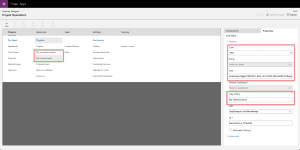
In the Site Map, when adding the new URL type element, do not insert the entire URL copied when opening the view. Instead, insert only the part after "dynamics.com":
/main.aspx?appid=**************&pagetype=entitylist&etn=msdyn_project&view=2ce26bab-a1f1-ee11-904b-000d3a64fb2d&viewType=1039
User Interface After Publishing the Site Map
For ongoing projects:

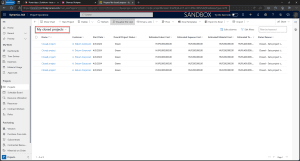
We see that the menu item did not switch to a new tab, and the selection remained on the chosen menu. Note that this menu item also points to the msdyn_project table, but displays the view relevant to us.
For closed projects

We see that the menu item did not switch to a new tab, and the selection remained on the chosen menu. Note that this menu item also points to the msdyn_project table, but displays the view relevant to us.
Additional Thoughts
It’s important to understand that this solution can be applied not only to custom views but also to other Dynamics 365 objects. Imagine how much we can integrate into the application!
Practical Tips
- Remember to test the solution in different browsers and devices to ensure the application’s overall compatibility.
- Use custom icons or labels for the menu items to make the Site Map even easier to navigate.
These innovations can revolutionize our work in Dynamics 365, allowing us to work more efficiently and take full advantage of the application’s capabilities! If you have any questions, feel free to contact us!

The Hierarchy of Administrative Work: New Dimensions in Backlog Structure

In project management, administrative tasks often blend with core project activities, causing confusion and reducing efficiency. When structuring backlogs, it's essential to consider the hierarchy of administrative tasks, which helps the team better organize and manage their work. The L1, L2, and L3 levels reflect the relationship of these administrative tasks. Let's see how we can apply this hierarchy to administrative work!
L1 – Basic Administrative Tasks
The L1 level includes fundamental administrative tasks that hold strategic importance for the entire organization. These tasks are crucial for the smooth operation of the project and may encompass a wide range of activities.
L2 – Intermediate Administrative Activities
The second level, L2, includes more complex administrative activities that are more specific than L1 tasks but still exceed daily routines. This category includes internal training, pre-sales activities, HR tasks, and activities that promote teamwork and communication. L2 activities are key to the company's long-term stability but generally require more time and planning than L1 tasks.
L3 – Complex Administrative Projects
The L3 level represents the most basic administrative tasks, such as daily report preparation or handling ad-hoc tasks. These tasks are more specific within each category.Structuring administrative tasks hierarchically in the backlog helps teams better understand and manage different types of work, allowing for more efficient resource utilization and time management.
Beyond the Green Checkmark: Azure DevOps Statuses at Visual Labs
At Visual Labs, we prioritize delivering client needs efficiently and on time. We use the Azure DevOps system, which helps us manage client needs in a structured way and ensures that we track every step of the process. With Features and User Stories, we accurately record where each need is in the delivery process, ensuring transparency and efficiency for the entire team and the client.

Feature: Features handle new client needs at the client request level. They go through the following stages:
During the process, it was determined that the feature is not needed. It can be set to Removed status.

User Story: User Stories relate to Features and break them down into more detailed tasks. User Stories follow the same phases as Features but have slightly different interpretations and applications:
- New: A new client request that has been realized and broken down into smaller units (i.e., User Stories). We know at a high level what needs to be done, but no one has started working on it yet.
- Design: When we start working on the User Story description and acceptance criteria, and plan the technical requirements and delivery.
- Awaiting Approval: The defined User Story is handed over to the client for approval to ensure it meets their expectations.
- Awaiting Delivery: After client approval, but before actual development and work begin. All conditions are met to start working on it, but work has not started yet.
- Under Delivery: The moment the development of the request begins.
- Under Deployment: The completed development is waiting for release in the client environment. The User Story gets Under Deployment status when the requested functionality has been delivered on our side, handed over to the client, and we are waiting for client validation.
- Closed: Once client-side validation is complete, the User Story can be closed. Ideally, this happens when the client closes the User Story, but we can also do it internally once we have received written validation.
- Removed: If it turns out that the development is not needed after creating the User Story, or it cannot be implemented as previously planned. The User Story gets Removed status and a new User Story is created to continue the development request.
Using the Azure DevOps system and having clear processes and statuses ensures we manage every client need efficiently and deliver on time. This enhances client satisfaction and improves the transparency and efficiency of the delivery process at Visual Labs.
