
How to build your context layer with Work IQ

Istvan Jaray
TL;DR
Work IQ is the part of your context layer that turns everyday operations into trustworthy signals for AI. It only works when your CRM, ERP, delivery, and collaboration tools share a common data backbone so records can travel end to end without duplication. Strengthen that backbone by fixing broken links like orphan tasks, generic time buckets, weak data validation, and manual handoffs that break context. Then test readiness by asking cross-system questions like true project cost versus quote or stalled opportunities without follow-up. If the answers require manual stitching, your context layer isn’t stable enough for autonomy yet. Once Work IQ is solid, you can scale into cross-domain meaning and governed retrieval in the next layers.
How to structure your context layer with Work IQ
Effective AI agents don't start with autonomy. They start with context you can trust. Before agents can reason, act, or provide insights that matter, your organisation needs a structured foundation of work and data that produces quality context as a by-product of everyday work.
But structured data alone isn't the goal. Complete integration is. The real value emerges when an agent can traverse your entire business operation in a single reasoning chain. Imagine asking your agent:
"How many hours did we work overtime on deliverable X for Customer Z, and what did that cost us?"
Or having it proactively nudge a sales rep to follow up on a lead that needs nurturing, then log a follow-up plan with tasks, timelines, and owners, all linked to the right opportunity.
These aren't futuristic scenarios. They're achievable today, but only when your systems are integrated tightly enough that a single record can travel from lead to opportunity, from project to timesheet, from deliverable to invoice, without context breaking along the way.
In this blog post, we share a practical framework for building a strong Work IQ layer: the part of your AI context stack that captures how work actually happens and turns it into structured, referential signals that AI can ground on.
(In Part 2 we'll discuss cross-domain context such as semantic business views and governed retrieval, but here we begin where you already have the most direct control: your operational systems and processes.)
What is Work IQ (in practical terms)?
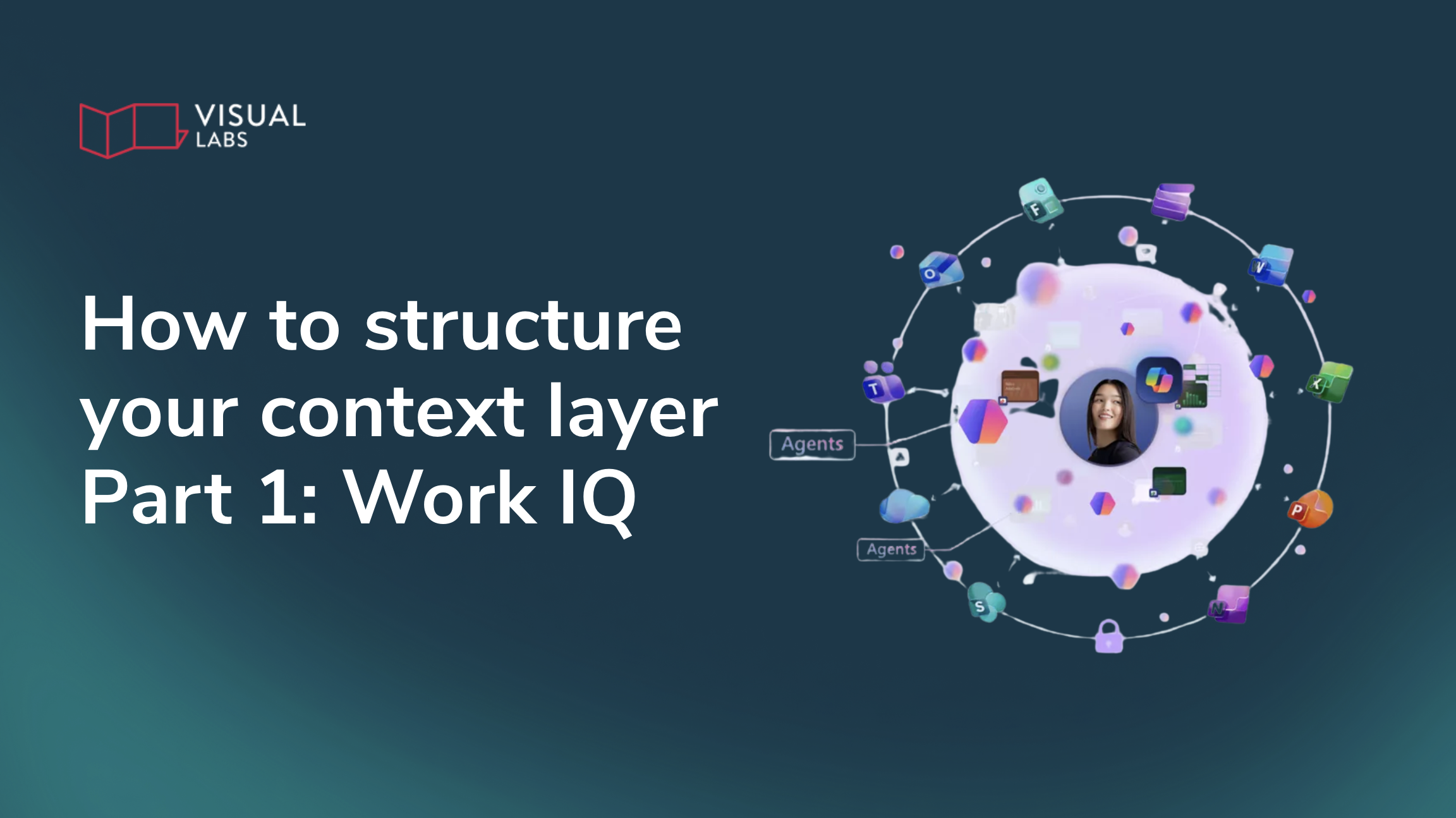
Work IQ is Microsoft's intelligence layer that captures how work unfolds across tools and systems, collecting signals from productivity platforms so AI agents can understand people, documents, conversations, and activities in context.
It's part of Microsoft's unified IQ framework alongside Fabric IQ and Foundry IQ, but its core advantage is that it lives in systems you already use (Microsoft 365, collaboration tools, CRM/ERP) and reflects real work patterns.
Read more about Work IQ, Fabric IQ, Foundry IQ, and how they differ from Microsoft Graph →
Now let's walk through the three steps to shape your Work IQ into a foundation that agents can actually reason over.
1. Build a shared data backbone
The most common integration pattern in organisations is point-to-point: the CRM is connected to the project tool, the project tool to the time tracker, the time tracker to the finance system. Each connection is its own effort, with its own mappings and sync logic. This works up to a point, but it becomes fragile fast. When an agent needs to trace a record across four or five systems in sequence, a single broken link means it gets a wrong answer, or no answer at all.
The more resilient approach is to give all your systems a shared home for core business records. Instead of connecting each system to every other system, connect them all to one shared layer. When a customer record is created or updated in one system, every other system already has access to it, because they are all reading from and writing to the same place.
What this looks like in the Microsoft ecosystem
In practice, this is the role that Dataverse plays across Microsoft's business platform. It's not just a database. It's the shared backbone that CRM (Dynamics 365 Sales), ERP (Microsoft F&O), project delivery (DevOps, Project Operations), and collaboration tools (Teams, SharePoint) all treat as their native data home.
Here's how we use it:
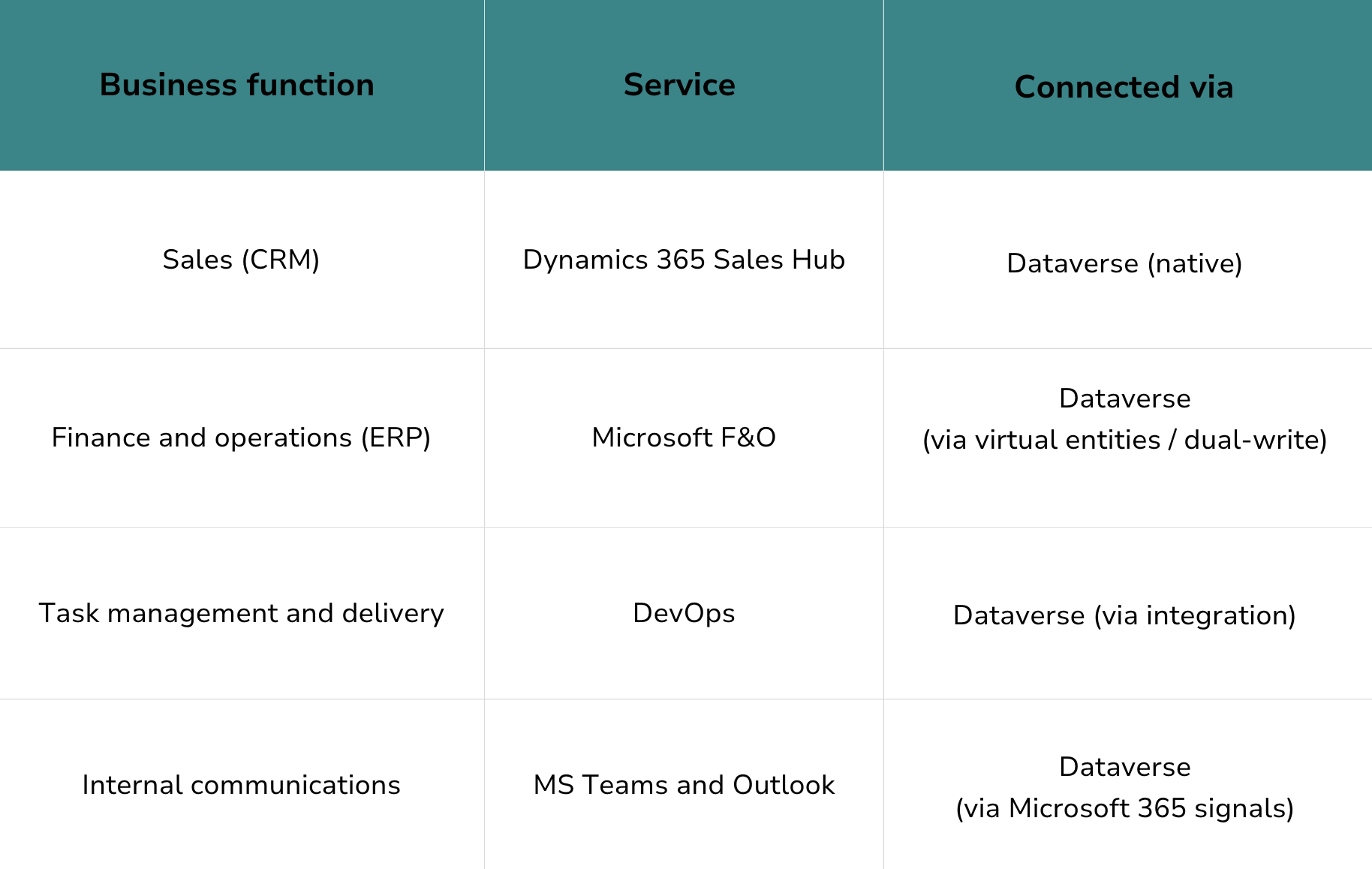
Although the exact stack may differ for your organisation, we suggest covering all core business functions with services that connect to a shared layer. This is where the Microsoft ecosystem has a distinct advantage: these services weren't bolted together after the fact. They were designed to share a common data foundation.
From first contact to final invoice: how a customer record travels through your systems
To see why a shared backbone matters, consider a single customer record.
It originates in Dynamics 365 Sales Hub during the sales process, as part of an opportunity. When the deal is won, a project record is created in the delivery system, but it doesn't start from scratch. It carries forward the customer reference, the contract value, and the deliverable structure from the original opportunity. Work items and timesheets logged against that project in DevOps all point back to the same record. When invoicing happens in F&O, the financial data connects to the same customer and project.
At no point was the record duplicated or re-entered. It was extended. This continuity is what makes it possible for an agent to answer a question like "what did deliverable X cost us for Customer Y?" in a single query, without stitching together exports from three different tools.
2. Strengthen the backbone
Having a shared data layer is the foundation. But it only works if the records that travel through it are complete, consistent, and properly linked. In practice, this means closing the specific gaps that cause records to lose context along the way.
Eliminate orphan tasks
Every task, work item, or time entry should connect to a business record. Review your backlog: if a task doesn't link to a customer, project, or cost centre, the agent can't attribute the work. Standardise tagging rules and enforce them going forward.
Quick test: Pick 20 random tasks from your backlog. If more than half lack a clear link to a customer or project, fix your tagging model before investing in AI automation.
Remove generic buckets
Hours logged to "internal," "miscellaneous," or "admin" are invisible to an agent trying to calculate project costs. Every hour needs a home. If the work genuinely doesn't belong to a customer project, create a structured internal category rather than a catch-all.
Enforce data quality at the point of entry
Poor data quality is almost always a process problem, not a tooling problem. Required fields, validation rules, and enforced state transitions prevent noise from entering the backbone in the first place.
For example: an opportunity cannot advance to "proposal sent" unless the expected close date and deal value are populated. A project can't be marked complete until delivery hours and costs are entered. These rules feel bureaucratic in isolation, but they're what make the backbone trustworthy at query time.
Automate handoffs between systems
When a deal is won, what happens next? If someone manually creates a project in a different tool and types in the customer name, you've introduced a potential break in the chain. Automate these transitions: winning an opportunity should auto-create a project record that carries forward the customer reference, contract value, and deliverable structure.
Anchor collaboration to the backbone
When a new project is created, auto-provision a Teams workspace and a SharePoint document library tagged to the same record. Apply consistent permissions and folder structures. This way, when an agent needs to combine collaboration signals (documents, meeting notes, decisions) with structured data (costs, timelines, deliverables), everything points back to the same place.
3. Test it by asking the questions
Come back to the questions from the introduction. The whole point of building a shared backbone and strengthening it is to make questions like these answerable:
- "What did deliverable X for Customer Y actually cost us, compared to what we quoted?"
- "Which open opportunities haven't had any follow-up activity in the last two weeks?"
- "How are our effective hourly rates trending across projects this quarter?"
Use AI to try answering them. Not as a production deployment, but as a test of your integration.
Things you can try:
- Ask AI to generate a draft quote from structured CRM data.
- Generate a project cost summary from linked tasks, timesheets, and financials.
- Produce a weekly executive briefing using your structured view of activity and outcomes.
- Ask the cross-system questions directly: "How much did deliverable X cost us for Customer Y?"
If the outputs are accurate, your backbone is holding. If they're inconsistent, require manual corrections, or miss data from one of your systems, you've found the next gap to close. Go back to step 2 and address it.
What we recommend: A skilled assistant that generates accurate drafts is usually 80% of the way to a capable autonomous agent. This helps teams see value early without risky autonomy, and it tells you exactly where the remaining integration gaps are.

Where complexity starts to grow
The steps above work well for individual domains and departments. But in complex, cross-domain environments with multiple business units, regional systems, compliance boundaries, and external data sources, a single backbone isn't enough.
That's where semantic models (Fabric IQ) and governed knowledge retrieval (Foundry IQ) become necessary. We'll cover those in our next blog post, with guidance on how to scale context across an enterprise without losing control.
Stay tuned for actionable steps to unify data meaning and retrieval across domains.
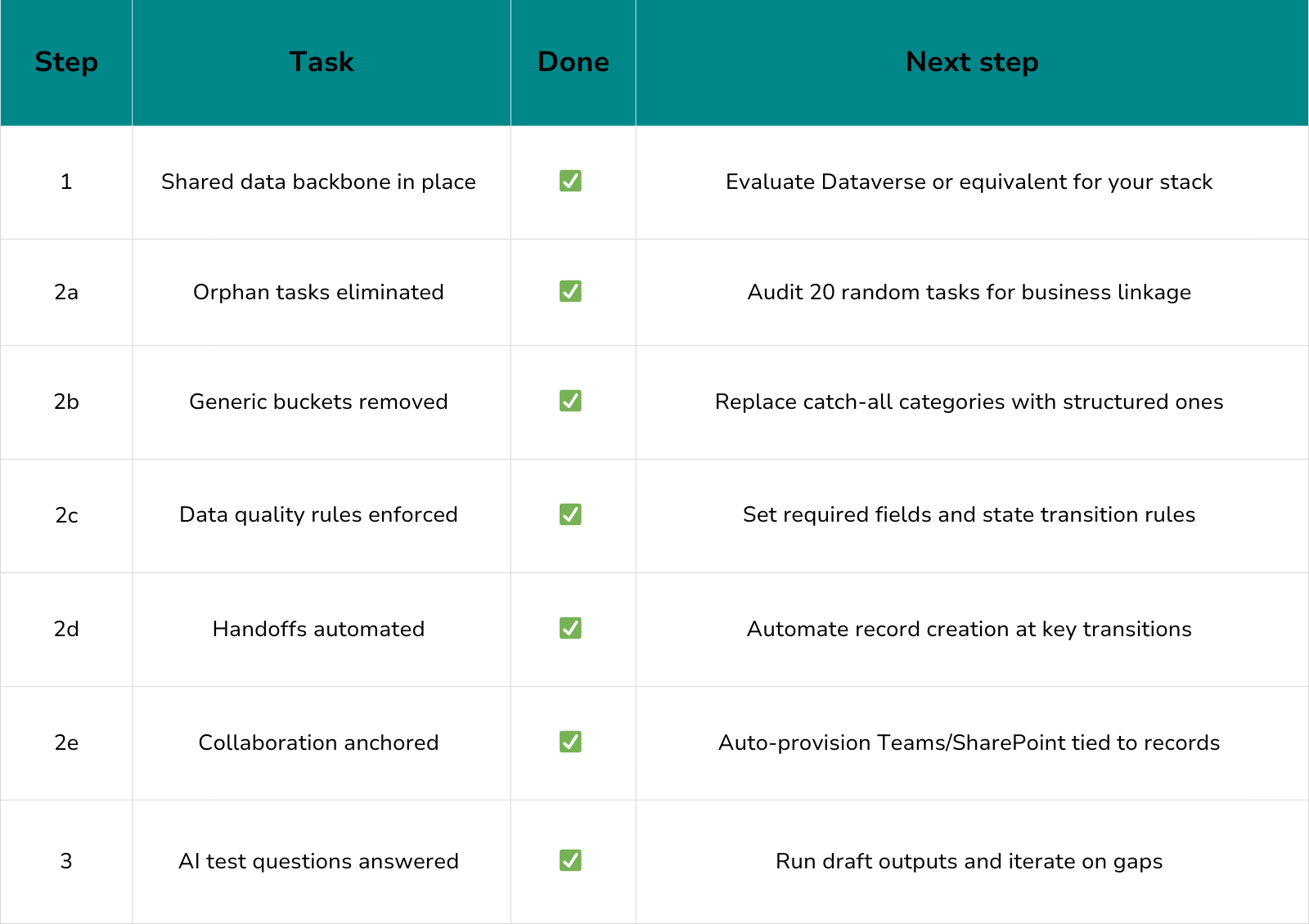
Practical readiness checklist
Want help turning context into value?
If your organisation spans multiple domains, systems, or regions, or if you're ready to scale beyond pilots to production-grade agent capabilities, a context architecture review can save months of trial and error.
Our team helps assess your Work IQ readiness, identify gaps in your data backbone, and design a roadmap that turns your structured work into trusted context for AI at scale.
👉 Contact us for a readiness audit and practical next steps.
Blog posts

How to structure your context layer Fabric IQ and Foundry IQ
Heading 1
Heading 2
Heading 3
Heading 4
Heading 5
Heading 6
Lorem ipsum dolor sit amet, consectetur adipiscing elit, sed do eiusmod tempor incididunt ut labore et dolore magna aliqua. Ut enim ad minim veniam, quis nostrud exercitation ullamco laboris nisi ut aliquip ex ea commodo consequat. Duis aute irure dolor in reprehenderit in voluptate velit esse cillum dolore eu fugiat nulla pariatur.
Block quote
Ordered list
- Item 1
- Item 2
- Item 3
Unordered list
- Item A
- Item B
- Item C
Bold text
Emphasis
Superscript
Subscript
How to build custom AI agents with Copilot Studio
Heading 1
Heading 2
Heading 3
Heading 4
Heading 5
Heading 6
Lorem ipsum dolor sit amet, consectetur adipiscing elit, sed do eiusmod tempor incididunt ut labore et dolore magna aliqua. Ut enim ad minim veniam, quis nostrud exercitation ullamco laboris nisi ut aliquip ex ea commodo consequat. Duis aute irure dolor in reprehenderit in voluptate velit esse cillum dolore eu fugiat nulla pariatur.
Block quote
Ordered list
- Item 1
- Item 2
- Item 3
Unordered list
- Item A
- Item B
- Item C
Bold text
Emphasis
Superscript
Subscript
Ready to talk about your use cases?
Request your free audit by filling out this form. Our team will get back to you to discuss how we can support you.
